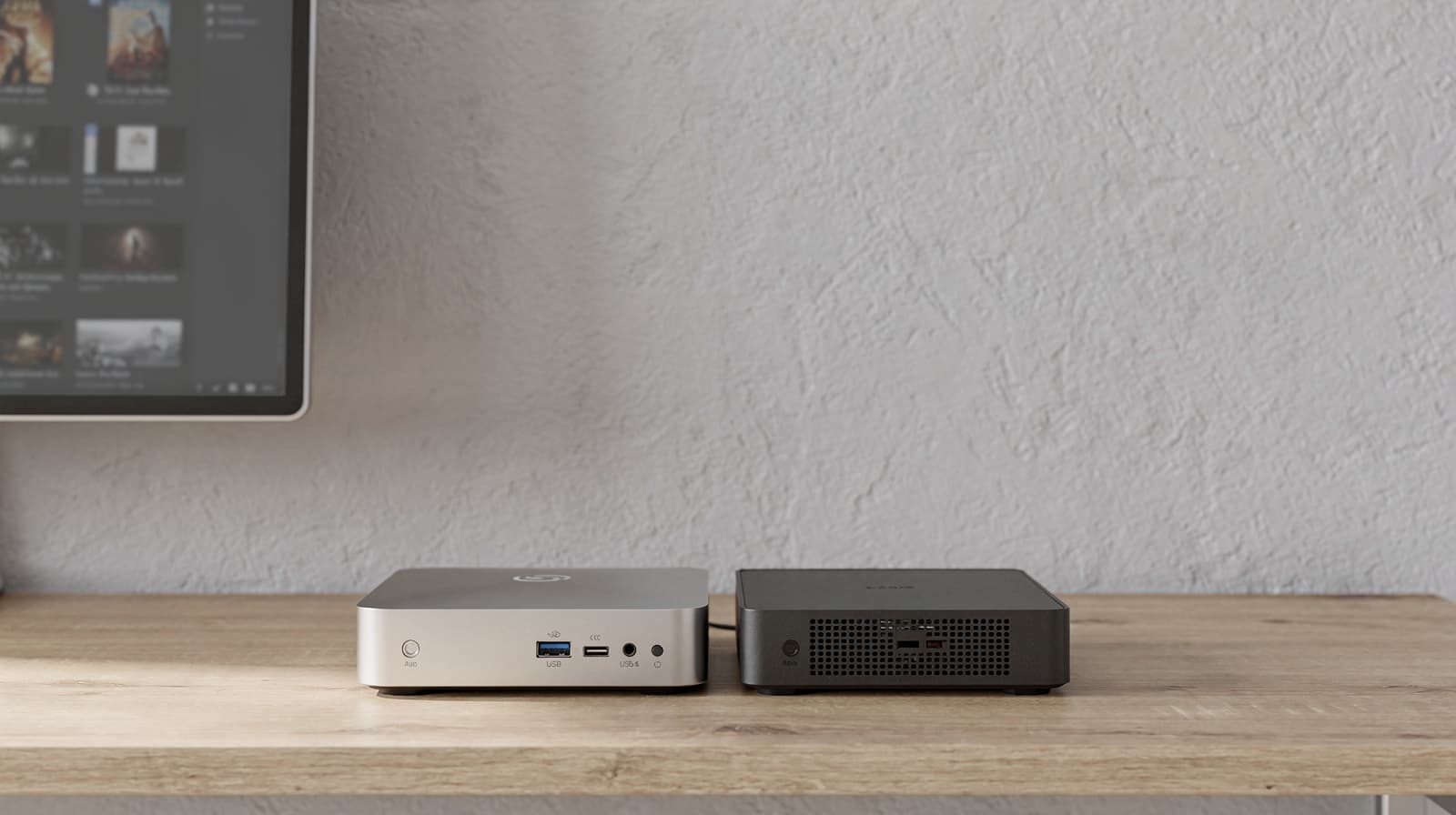
Most people should buy the ASUS NUC 14 Essential for a Plex server, or the fanless MINIX Z150-0dB if they want one that works out of the box. Both use the Intel N150, whose Quick Sync Video handles the 1080p and 4K transcodes a household needs, as long as you have a Plex Pass to switch hardware acceleration on. You probably want one anyway: since April 2025, watching your own library away from home also needs a Plex Pass or a Remote Watch Pass. The ODROID-H5 board is the pick for builders. This guide is part of our complete guide to mini PCs for a home server.
Our picks at a glance
- View at Best Buy
Best for a Plex server you build yourself
- View at Newegg
Best ready-to-use Plex mini PC
- View at Hardkernel
Best board for a Plex server with room to grow
The picks in detail
- Top pick
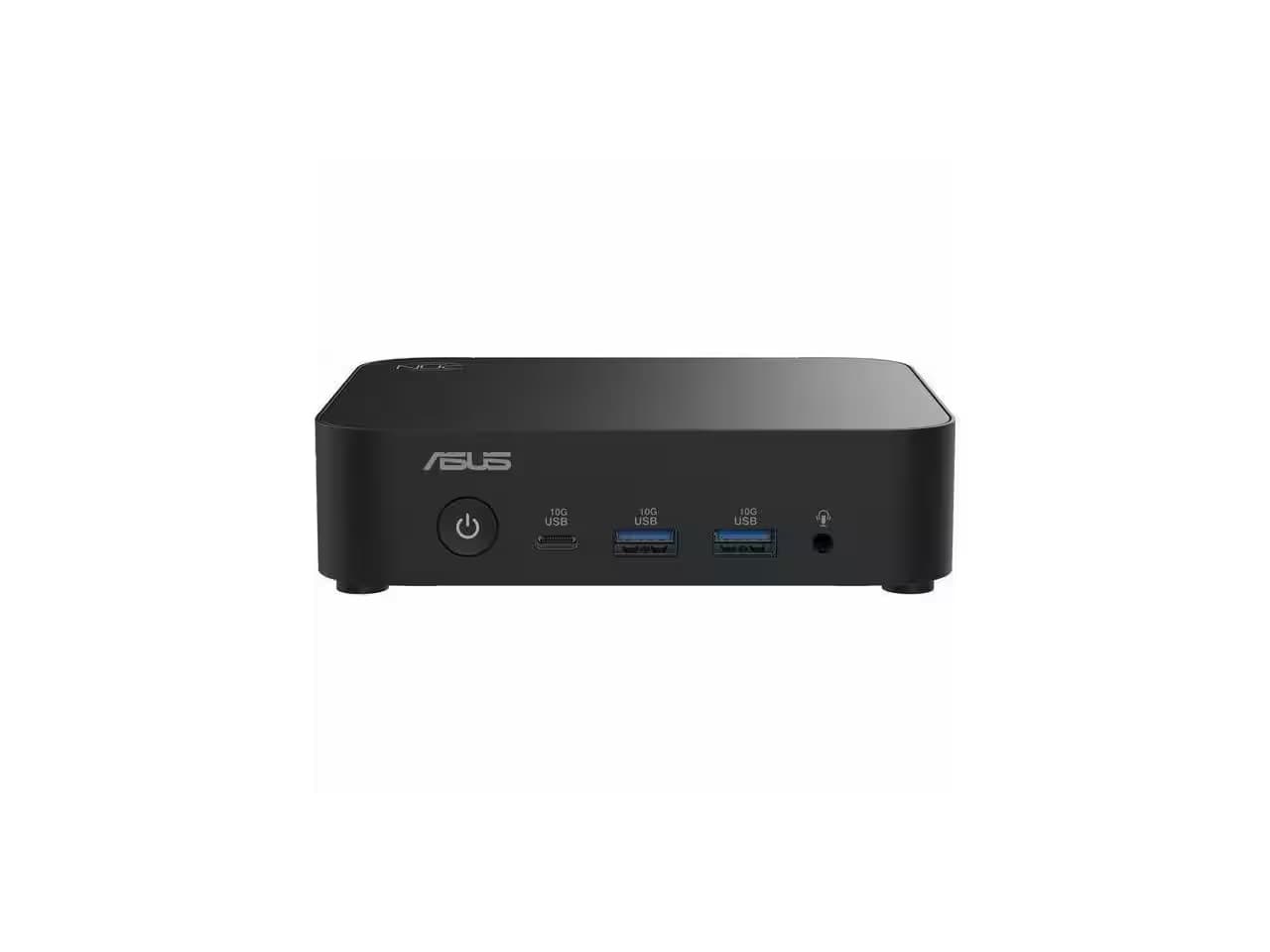
Best for a Plex server you build yourself
ASUS NUC 14 Essential Kit, Intel N150 (RNUC14MNK150000U)
The ASUS NUC 14 Essential is the Plex box most people should buy if they are happy to add memory and an SSD.
View at Best BuyIts Intel N150 has Quick Sync Video, which handles 1080p and 4K transcodes once hardware acceleration is on. The kit has 2.5G Ethernet, two M.2 slots (one NVMe, one SATA) and USB 3.2 Gen 2 ports for external drives, and ASUS supports Ubuntu 24.04 LTS, one of the Linux systems Plex officially supports for hardware acceleration. Buy it if you want to run Linux or choose your own SSD. Skip it if you want a machine that works the day it arrives.
What we like
- Intel N150 with Quick Sync Video
- 2.5G Ethernet, two M.2 slots, USB 3.2 Gen 2 ports
- Windows 11 and Ubuntu 24.04 LTS supported
Watch out for
- No memory, storage or operating system included
- Hardware transcoding and remote streaming both need a Plex Pass
- ASUS doesn’t publish a noise figure
- Best ready-to-use Plex mini PC
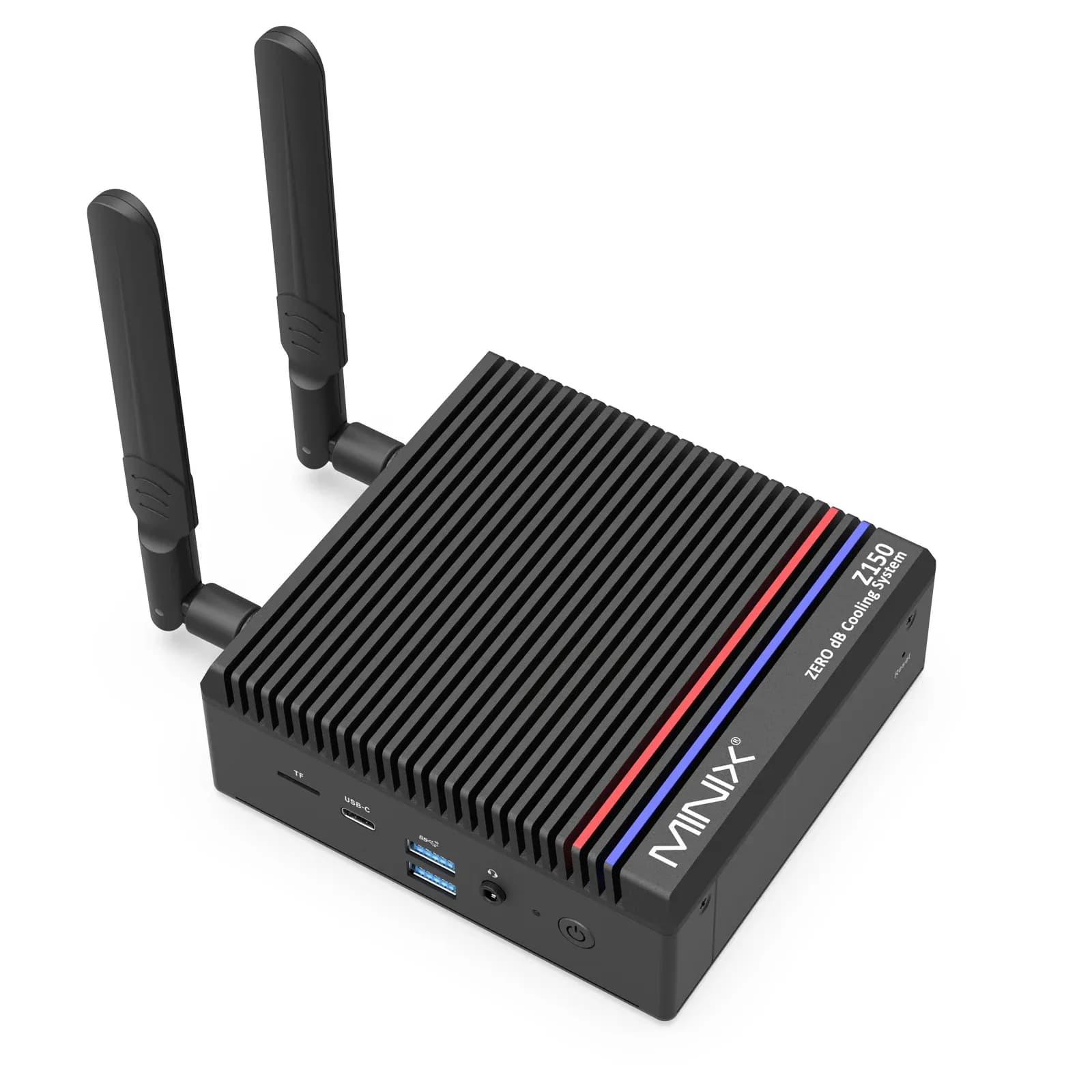
MINIX Z150-0dB Fanless Mini PC, 16GB/512GB (Z150-0dB)
The MINIX Z150-0dB has the same Intel N150 and arrives ready to use with 16GB of memory, a 512GB NVMe SSD and Windows 11 Pro, so you can install Plex Media Server straight away.
View at NeweggIt has no fan, which suits a living room or an office, plus 2.5G Ethernet and two USB 3.2 Gen 2 Type-A ports for external drives. With one M.2 slot and a microSD slot, a large library will live on an external drive. Buy it if you want Plex running tonight with no noise. Skip it if you want several internal drives.
What we like
- Ready to use: 16GB, 512GB SSD and Windows 11 Pro
- Fanless, with 2.5G Ethernet
- Same Intel N150 with Quick Sync Video
Watch out for
- One M.2 slot, so a big library needs external storage
- Both retailer listings are marketplace sellers
- Hardware transcoding and remote streaming both need a Plex Pass
- Best board for a Plex server with room to grow
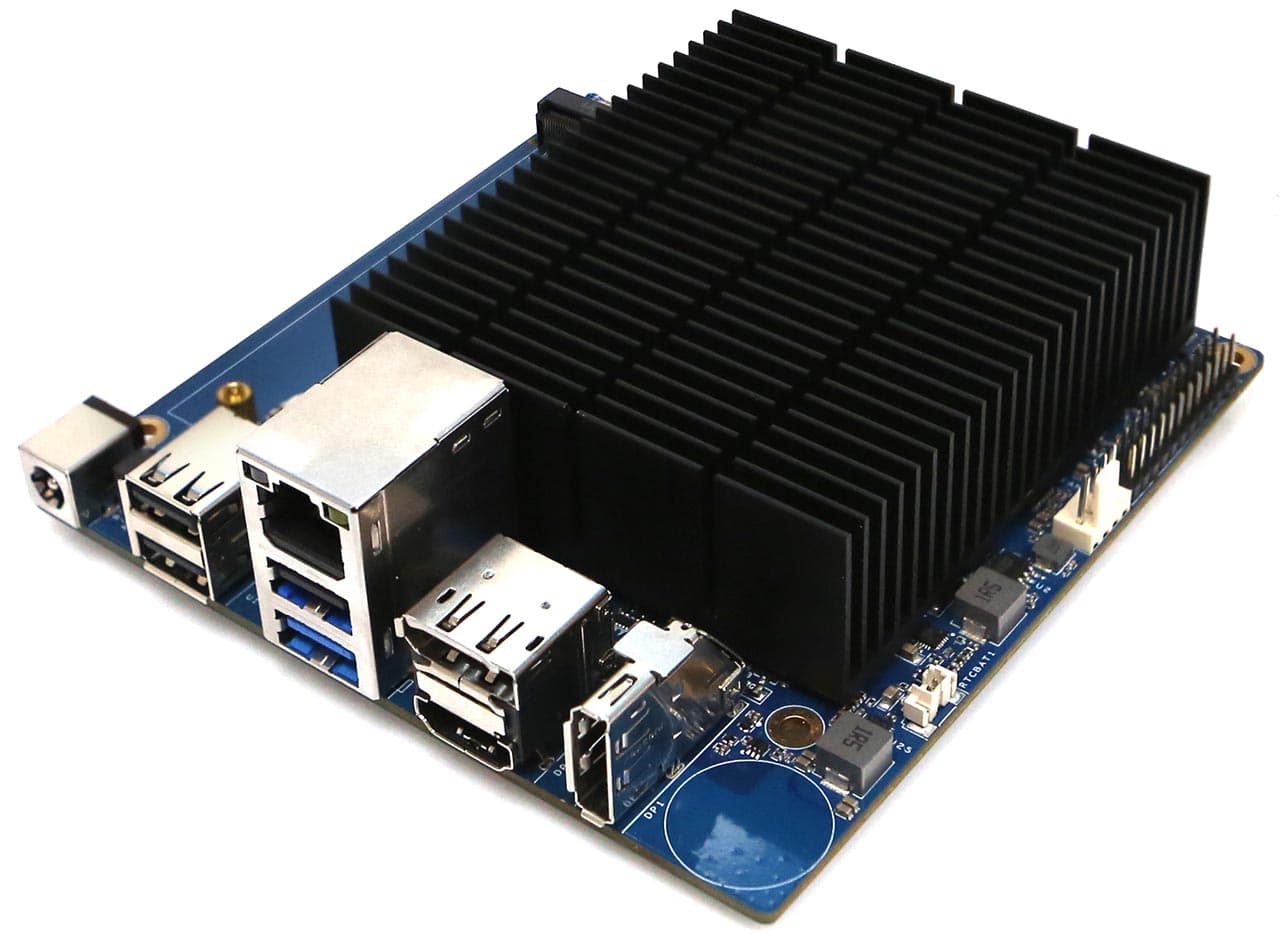
Hardkernel ODROID-H5 (ODROID-H5)
The ODROID-H5 is a bare board with an eight-core Intel Core i3-N300, which has Quick Sync Video and about half again the processing power of the N150.
View at HardkernelIt has onboard 10GbE Ethernet, four M.2 slots and one DDR5 SO-DIMM slot, and Hardkernel measures about 3.3W at headless idle. You supply the memory, storage, case and a 15V/4A power adapter. With one USB 3.0 port and three USB 2.0 ports, a big library belongs on internal M.2 SSDs, not external drives. Buy it if you like building and want headroom for a NAS-style media server. Skip it if you want a finished box.
What we like
- Intel Core i3-N300 with Quick Sync Video and eight cores
- Onboard 10GbE Ethernet and four M.2 slots
- About 3.3W at headless idle (Hardkernel figure)
Watch out for
- No Wi-Fi, and memory, storage, case and power adapter are extra
- Only one USB 3.0 port for external drives
- Hardkernel warns that parts for future H5 production are hard to secure
The short version
- Best for a Plex server you build yourself: ASUS NUC 14 Essential (N150 kit). Two M.2 slots, 2.5G Ethernet, Quick Sync Video. You add memory, an SSD and an operating system.
- Best ready-to-use Plex mini PC: MINIX Z150-0dB. Fanless, 16GB and a 512GB SSD, Windows 11 Pro installed.
- Best board for a Plex server with room to grow: ODROID-H5. Core i3-N300, 10GbE, four M.2 slots. No case, memory or storage included.
- Can an N150 transcode 4K? Yes with hardware acceleration, which needs a Plex Pass. Without one, no: it is far too slow to transcode 4K in software.
- Watching away from home? You need a Plex Pass or a Remote Watch Pass. A Plex Pass covers both that and hardware transcoding.
What Plex needs from a mini PC
Plex Media Server runs on Windows, macOS and Linux, plus NVIDIA SHIELD and many NAS devices. For a mini PC, Plex's requirements page boils down to this:
- Operating system. Windows 10 (version 1607) or newer, or a supported Linux such as Ubuntu 16.04 or newer.
- Processor type. On Windows, only Intel or AMD (x86) processors; Plex doesn't support Arm-based Windows systems.
- Processor power. A minimum of "Intel Core i3 (or equivalent) or faster". A slower processor can run Plex but may struggle when it has to transcode.
- Memory. 4GB of RAM is typically more than enough.
These are minimums for one person. If several people stream at once and some streams need transcoding, you need more, which is where Quick Sync comes in.
Direct Play, transcoding and Quick Sync
Transcoding means converting a video to a different quality or format while you watch. Plex does it automatically when a device can't play a file as it is, or when the network can't carry the full quality. It is the most demanding job Plex gives a processor, and it happens more than people expect:
- Playing on a device inside your home often works without transcoding, because home networks are fast.
- Remote access "will very often require transcoding", in Plex's words, because the connection away from home is usually slower.
- Subtitles in many Plex apps are "burned in" to the video, which also means transcoding.
- Two streams that both need transcoding need about twice the processing power of one.
Hardware-accelerated streaming
Plex can hand transcoding to the video engine built into the processor, which on Intel chips is Quick Sync Video. That lets a small computer stream more videos at once, start faster and buffer less, especially with 4K and HEVC files, while using less power. Intel lists Quick Sync Video for both the N150 and the Core i3-N300.
What you need:
- A Plex Pass. Hardware-accelerated streaming is a Plex Pass feature.
- A supported Intel processor with Quick Sync Video. Plex wants a 2nd-generation Core or newer, and a 7th-generation or newer for HEVC encoding; both chips here are 2023 to 2025 designs.
- Plex Media Server 1.9.3 or later, and 1.41.3 for HEVC encoding.
- The setting turned on. In the Plex web app, go to Settings, Server, Transcoder, turn on Show Advanced, then turn on "Use hardware acceleration when available".
To check it is working, play a video, pick a lower quality to force a transcode, open the Activity dashboard in the Plex web app and look for "(hw)" next to the video format.
Limits to know before you buy:
- Hardware-encoded video can look slightly softer than software, most noticeably below 720p or at low bit rates.
- HEVC encoding needs more resources, and Plex labels it experimental. Leave the default H.264 output unless you have a reason.
- Plex says hardware acceleration doesn't work inside a virtual machine. Docker is simpler: Plex supports hardware acceleration in a container with a supported Intel processor and a Plex Pass.
- On Linux, Plex officially supports hardware acceleration on 64-bit Ubuntu and Fedora. Other distributions may work.
How much processor is enough? Can an N150 transcode 4K?
With hardware acceleration on, yes. Quick Sync decodes H.264 and HEVC video and encodes H.264 in hardware, which is exactly the work of turning a 4K file into a 1080p stream for a phone or an older TV. Plex sets no artificial limit on simultaneous Intel hardware transcodes, so the N150 handles the 1080p transcodes most households need, plus 4K-to-1080p conversions. Plex doesn't publish a stream count for any processor, and we haven't measured one, so treat a few simultaneous streams as comfortable rather than a number to plan to the limit.
4K HDR needs tone mapping. Most 4K files are HDR, and when Plex converts one for an SDR screen it has to tone map the colors or the picture looks washed out. Plex does this in hardware on Intel processors from Kaby Lake onward on Linux and Docker, and from Tiger Lake onward on Windows. The N150 and i3-N300 are newer designs than both. Like hardware transcoding, tone mapping needs a Plex Pass. If you run Windows on an Intel chip, Plex adds brightness, contrast and saturation controls, because hardware tone mapping there can come out dark.
Without a Plex Pass, the N150 is a poor choice for 4K. Plex then transcodes in software, and its guideline for one software transcode is a PassMark score of about 2,000 for a 1080p H.264 file, 12,000 for 4K SDR and 17,000 for 4K HDR. PassMark listed the N150 at about 5,300 and the Core i3-N300 at about 8,000 in October 2026. That is enough for roughly two software 1080p transcodes on the N150 and four on the i3-N300, and not enough for a single 4K transcode on either. Plex's own warning applies: the guideline is rough, not a measurement.
The short answer: get a Plex Pass, turn on hardware acceleration, and an N150 is plenty for a household. Without a Plex Pass, any of these will still Direct Play 4K to a TV that supports the file, but none will convert it.
Plex Pass, Remote Watch Pass and the 2025 change
Since 29 April 2025, streaming your own videos from your Plex server when you are away from home needs one of three things:
- The server owner has a Plex Pass. That covers the owner and everyone they share the server with.
- You have a Plex Pass on your own account.
- You have a Remote Watch Pass, a separate subscription that allows remote streaming for your account (and its Managed Accounts) and nothing else.
The rule applies to video, not to music in Plexamp or photos in Plex Photos. It is enforced in the newer Plex apps, including the mobile apps, the web app, the Windows, Mac and Linux apps, Roku, supported smart TVs, PlayStation and Xbox, and Plex says the rest will follow.
For a server owner, the Plex Pass is the one to budget for. It switches on hardware transcoding, which remote streams usually need, and it covers remote streaming for every account you share with. A Remote Watch Pass covers only remote viewing on one account and doesn't turn on hardware transcoding.
One gotcha: Plex treats a connection as "remote" whenever the app can't detect the server on the same local network. A server inside a virtual machine or container without host networking, a VPN, or a network split into several subnets can make streaming inside your own home count as remote. If Plex asks for a pass at home, check those first.
Storage and network
Plan the storage first, because a media library takes far more room than the system.
- The operating system and Plex. Put them on an SSD. All three picks have an M.2 slot for one.
- Your library. The ASUS has an M.2 NVMe slot and an M.2 SATA slot (128GB to 2TB each). The MINIX has one NVMe slot (up to 4TB) and a microSD slot. For a large library, most people add an external drive: the ASUS and the MINIX have USB 3.2 Gen 2 ports, while the ODROID-H5 has one USB 3.0 port and three USB 2.0 ports, so it is better with its own four M.2 slots. Our guide to external SSDs covers fast portable options, and a NAS can hold the library while the mini PC runs Plex.
- The network. Both mini PCs have 2.5G Ethernet and Wi-Fi, and the ODROID-H5 has 10GbE and no Wi-Fi. For a server, use the cable; our Ethernet vs powerline vs mesh guide covers getting one to where the server sits. The connection away from home is limited by your internet upload speed, not by the mini PC.
How the picks compare
Model | Processor | PassMark (approx.) | Quick Sync Video | Memory | Storage slots | Ethernet | Fan | OS |
|---|---|---|---|---|---|---|---|---|
ASUS NUC 14 Essential (N150 kit) | Intel N150, 4 cores | 5,300 | Yes | Add your own, up to 16GB DDR5 | M.2 NVMe and M.2 SATA | 2.5G | Not stated by ASUS | None included; Windows 11, Ubuntu 24.04 LTS supported |
MINIX Z150-0dB (16GB/512GB) | Intel N150, 4 cores | 5,300 | Yes | 16GB DDR4 included | M.2 NVMe and microSD | 2.5G | None | Windows 11 Pro installed |
ODROID-H5 (board) | Intel Core i3-N300, 8 cores | 8,000 | Yes | Add your own DDR5 SO-DIMM | Four M.2 slots | 10G | Passive heatsink, optional fan connector | None included; runs Windows 11 and Ubuntu |
Which one should you buy?
The two mini PCs share a processor, so the choice is about what surrounds it. Choose the ASUS NUC 14 Essential if you would rather build the server yourself, want a second M.2 slot, or plan to run Linux; Ubuntu 24.04 LTS is one of the systems Plex officially supports for hardware acceleration. Choose the MINIX Z150-0dB if you want a machine that works out of the box with no fan noise.
Choose the ODROID-H5 if you want a server with room to grow: more processing power, 10GbE and four M.2 slots. It asks the most of you, because you supply the memory, storage, case and power adapter.
On memory, Intel officially lists 16GB for both the N150 and the i3-N300; MINIX lists up to 32GB and Hardkernel up to 64GB, but 16GB is the only figure Intel guarantees. Plex needs about 4GB, so it doesn't matter for Plex alone.
When a NAS or a simpler device is enough
A mini PC is not always the answer:
- A NAS. One box stores the media and runs the server, which is why it is popular. But most consumer NAS devices have weak processors, and some have Arm chips that can't transcode at all. Check Plex's NAS compatibility list before you buy one for Plex; for HEVC output, Plex wants a Jasper Lake or newer Intel processor.
- A device that plays everything as it is. If every screen you use can play your files without conversion, the server barely needs to transcode, and Plex suggests an Intel Atom at 1.2GHz as the minimum for that.
- An NVIDIA SHIELD. It runs hardware-accelerated streaming without a Plex Pass, though remote streaming still needs a pass.
A Raspberry Pi is a poor Plex server for transcoding: the Pi 5 has no hardware H.264 encoder. Our Raspberry Pi 4 vs Pi 5 comparison covers what it is good at instead.
How we chose
This guide is research-based. We have not tested Plex on these machines. Plex details come from Plex’s support pages, processor details from Intel and PassMark, and product details from each maker’s spec page, all linked under Sources. We looked for machines Plex can use with hardware acceleration: an Intel processor with Quick Sync Video on Intel's own page, a wired network port and an SSD slot, sold at a named US store. We note when a listing is a marketplace seller, and we don't compare what the shops charge.
Questions people ask
Can an Intel N150 transcode 4K in Plex?
Yes, with hardware acceleration, which needs a Plex Pass: its Quick Sync Video handles 4K-to-1080p transcodes, and Plex can tone map HDR on it. Without a Plex Pass it transcodes in software, and at about 5,300 on PassMark it falls far short of the 12,000 Plex suggests for one 4K transcode.
Do I need a Plex Pass for hardware transcoding?
Yes. Hardware-accelerated streaming is a Plex Pass feature, with a few exceptions such as the NVIDIA SHIELD. Without a Plex Pass, Plex transcodes in software.
Do I need a Plex Pass to watch my own media away from home?
Yes, since April 2025. The server owner needs a Plex Pass (which covers everyone they share with), or you need your own Plex Pass or a Remote Watch Pass. Music and photos are not affected.
What is the best mini PC for a Plex server?
For most people, the ASUS NUC 14 Essential with an Intel N150, or the MINIX Z150-0dB if you want it ready to use and silent. Both have Quick Sync Video, 2.5G Ethernet and an SSD slot.
Does Plex hardware transcoding work in a virtual machine?
Plex says no. Docker is simpler and supported.
How much RAM does a Plex server need?
About 4GB is typically more than enough for Plex itself. More helps if the computer also does other jobs.
Sources we used
- Using Hardware-Accelerated Streaming (Plex Support)
- HDR to SDR Tone Mapping (Plex Support)
- Requirements for Remote Playback of Personal Media (Plex Support)
- Remote Watch Pass Overview (Plex Support)
- Plex Media Server Requirements (Plex Support)
- What kind of CPU do I need for my Server? (Plex Support)
- Intel Processor N150 specifications (Intel)
- Intel Core i3-N300 specifications (Intel)
- Intel N150 benchmark (PassMark)
- Intel Core i3-N300 benchmark (PassMark)
- ASUS NUC 14 Essential tech specs (ASUS)
- MINIX Z150-0dB specifications (MINIX)
- ODROID-H5 specifications (Hardkernel)
- Raspberry Pi processors: BCM2712 video hardware (Raspberry Pi documentation)