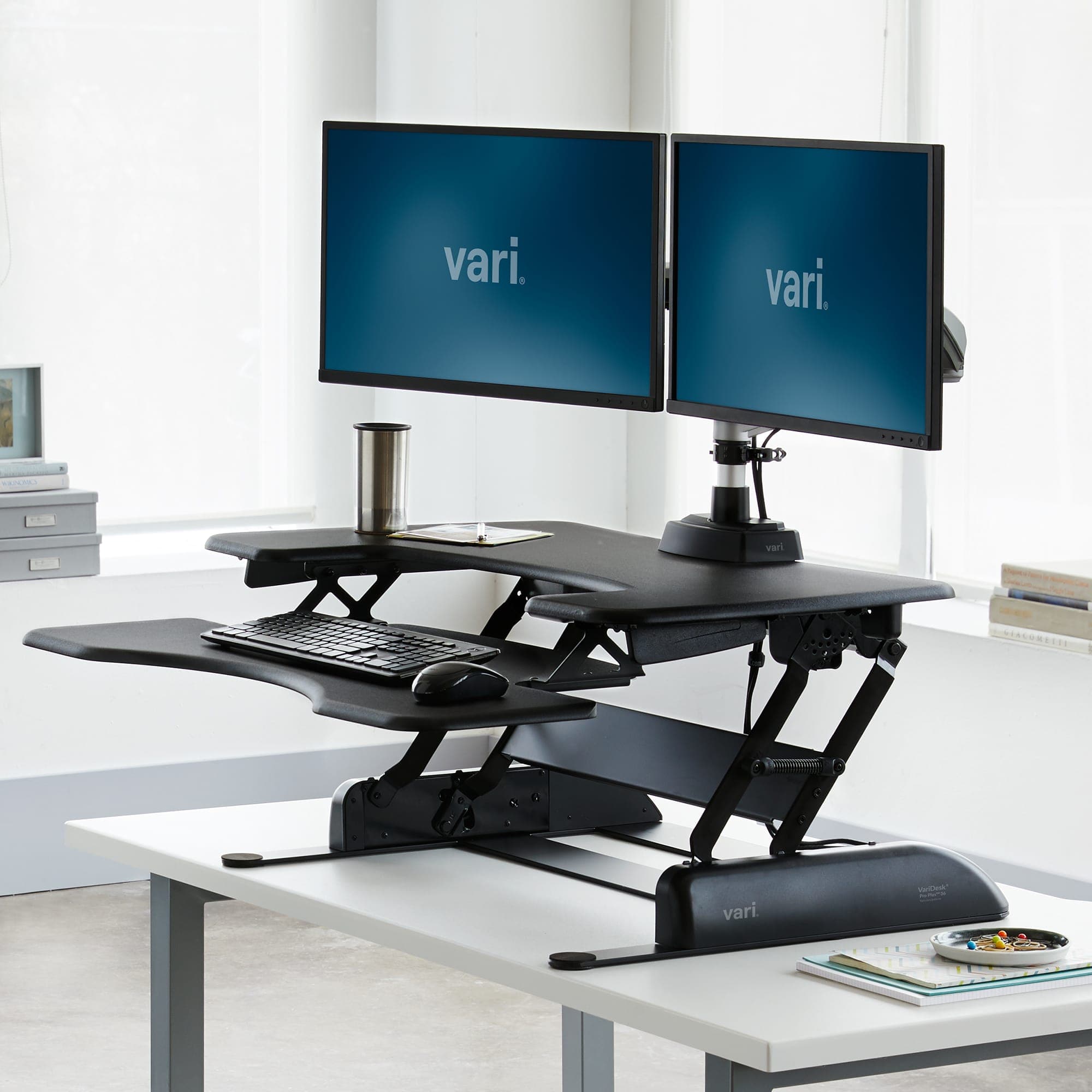
Choose a standing desk converter if you want to keep an existing desk and can fit the converter's base, keyboard tray and equipment comfortably. Choose a full sit-stand desk if you want the whole work surface to move and are ready to replace the furniture. Measure both seated and standing arrangements before ordering: neither choice is automatically the right fit for every person or room.
For room measurements, computer connections and the rest of the workspace, follow our complete Australian home-office setup guide.
This comparison is research-based. We have not tested these desks or converters ourselves. It is a guide to dimensions, layout and purchasing decisions, not a claim that a desk treats pain or improves health. Manufacturer references are listed under Sources.
Standing desk converter vs standing desk: the trade-offs
The key difference is what moves. A converter raises part of your workspace on top of existing furniture. A full height-adjustable desk raises the main work surface.
Decision | Converter | Full sit-stand desk |
|---|---|---|
Keep the existing furniture | Usually the intended approach | Usually replaces the current desk |
Writing and computer work at the same height | Limited by the converter's platform | More of the work surface moves together |
Keyboard and mouse space | Often a separate tray; measure it | Depends on the desktop and accessories |
Seated setup | Includes the converter's lowest position | Depends on the desk's minimum height |
Installation | Check placement, weight and assembly instructions | Plan assembly, room access and cable routing |
Moving house | Existing desk and converter remain separate items | Check how the desk disassembles and fits through doors |
Use this as a shortlist filter rather than a product ranking. A converter is not necessarily small or easy to carry, and a full desk is not necessarily a better choice for a compact room.
Our Australian keyboard and mouse guide can help you plan the input-device area. Include those devices in your measurements instead of choosing the furniture first and hoping they fit.
Measure the existing desk before shopping
Record the width, depth and height of your current desk, then sketch where the equipment sits. Include monitor stands, a laptop stand, speakers, a microphone, documents and the space your mouse actually uses. Measure the usable surface, not just the outer dimensions.
For a converter, obtain the base footprint, keyboard-tray dimensions and movement diagram. A product's headline width may describe its upper platform rather than the space required by everything attached to it. Check where the keyboard tray sits when lowered and whether it projects beyond the desk edge.
Our suggested method is to mark the proposed footprint with removable paper or card. Place the keyboard and mouse within that outline and try your normal tasks while seated. This is a layout exercise, not a substitute for checking the manufacturer's load and installation requirements.
A specification example, not a product recommendation
Ergotron's WorkFit-T and WorkFit-TL sheet lists different keyboard-tray dimensions: approximately 62.9 by 23.5cm and 69 by 28cm respectively. It also lists separate platform dimensions and load ranges. That is why “large enough for two monitors” does not answer whether your keyboard and mouse will fit. See the WorkFit specification sheet under Sources.
The lesson is to compare each relevant dimension for the exact model. Do not transfer a measurement from another size in the same range, and do not assume an accessory shown in a promotional photograph is included.
Check the lowest working position first
A product that reaches a useful standing height can still be awkward when lowered. Test or model the seated arrangement before focusing on the maximum height. Consider the keyboard position, screen position and the space needed to move your chair normally.
For a full desk, read whether the quoted range includes the desktop. IKEA's Australian MITTZON documentation, for example, provides a height range and assembly guidance for specific configurations. Those measurements are a prompt to check fit, not a promise that the desk suits your particular setup. See the Australian product page and manual under Sources.
Ask the seller for clarification when the frame-only dimensions and complete-desk dimensions are mixed together. Write the answer beside the exact model code. This avoids comparing a bare frame from one brand with a complete desk from another as though the figures describe the same thing.
Count the equipment weight correctly
List everything the moving surface will carry. Include the monitor and its stand or arm, laptop, dock, microphone, speakers and accessories. Then check the manufacturer's definition of capacity: the desktop, an attached arm or a keyboard tray may be treated separately.
A converter also adds its own weight to the existing desk. Confirm that the underlying furniture is appropriate for the complete arrangement, including the converter. A load limit for the moving platform is not automatically the allowable total load for your old table.
Our recommendation is to avoid guessing from appearance. If your desk has a thin top, unusual construction or a proposed clamp attachment, ask the manufacturer whether the arrangement is suitable. Do not improvise a reinforcement solely because an online photograph shows a similar-looking setup.
Plan the space for the keyboard, mouse and documents
Try the full set of tasks you perform at the desk. A tray may hold a keyboard neatly but leave little room for mouse movement, a wrist support or a second input device. A larger platform may occupy the area where you normally write.
For work involving frequent paperwork, we would give the full moving surface extra weight in the decision. For a mainly computer-based setup on furniture you want to keep, a converter may be the more convenient arrangement. These are preferences to test with your own equipment rather than universal rules.
If you are choosing a new display too, our Australian USB-C monitor guide covers the monitor decision. Record its stand footprint and adjustment range before finalising the desk layout.
Allow cables to move through the full range
Before the first powered adjustment or manual lift, follow the product's assembly and cable-management instructions. Plan the connections to the laptop, screens and peripherals, plus any lead reaching a wall socket or fixed device.
Our practical check is to follow each cable from end to end and identify which parts move with the surface. Leave the appropriate slack according to the product instructions, secure cables where directed, and check for snagging throughout the intended movement. Do not rely on the lowest position looking tidy.
Consider objects beside and underneath the desk as well: shelves, drawers, window ledges and storage units may restrict movement. A clear tabletop does not mean the area around the moving furniture is clear. Keep the installation manual available rather than treating assembly as complete once the furniture stands upright.
Buying for an Australian home office
Confirm the exact Australian configuration and included accessories. For electric furniture, check that the supplied power equipment is the local version. For either type, ask about delivery to your postcode, assembly requirements, packaging dimensions and the process for returning an unsuitable item.
Do not assume a delivered desk can be returned after assembly under every seller's change-of-mind policy. Read the conditions before ordering and distinguish them from any rights relating to a faulty product. This article does not attempt to interpret a particular retailer's terms.
If you live in an apartment or expect to move, check the route from the delivery point to the workspace. Doorways, stairs and lift access are practical considerations. A product that fits the room still needs to reach it.
A trial checklist before deciding
- Sketch your equipment layout. Include documents, the mouse area and any accessories you expect to keep.
- Compare dimensions by component. Check the base, moving platform, keyboard tray and monitor arrangement separately.
- Check seated use. Assess the lowest intended working position before the highest one.
- Check standing use. Confirm the whole arrangement remains usable at your intended height.
- Verify loads and attachments. Use the manufacturer's definitions for the exact product.
- Plan all cable paths. Include fixed sockets and devices that will not move with the surface.
- Read delivery and return conditions. Resolve uncertainties before placing the order.
If you can visit a showroom, take your measurements and, where practical, the dimensions of your keyboard and mouse area. Spend time in both positions and try the controls. A brief look at a raised display model tells you less than checking the complete arrangement.
Which option would we choose?
We would start with a converter when the existing desk already works well and the measured platform arrangement fits without compromising seated use. We would start with a full sit-stand desk when replacing the furniture is acceptable and having documents, input devices and screens move together is useful.
If neither option fits the room or your equipment, pause the purchase. A completed measurement sheet is a better next step than choosing on appearance alone. The goal is a workable desk arrangement that you can use and adjust easily, not a particular furniture category.
Questions people ask
Is a standing desk converter always smaller than a full desk?
No. Check the base footprint, tray projection and moving clearance. It also sits on furniture you already need room for.
Can I put any converter on my existing desk?
Check both manufacturers’ requirements. The existing desk must suit the converter’s footprint, weight and intended equipment load.
Should I compare the maximum height first?
Check both ends of the range, including the seated position. A useful standing height does not establish that the lowered keyboard position will work for you.
Will a standing desk fix back pain?
This guide makes no health or treatment claims. It compares furniture layout and fit; a product’s adjustability is not a treatment guarantee.