Most people moving away from a flat mouse should buy the Logitech Lift. As a vertical mouse it changes how you hold it, not how you point, so you are up to speed within days. The Logitech MX Ergo S trackball is the better buy if you are right-handed with medium to large hands and want a device that stays put while your thumb steers the cursor. Our ergonomic keyboard and mouse guide covers the rest of the desk, keyboard included.
Our picks at a glance
- View at Amazon AU
Best vertical mouse for small to medium hands
Logitech Lift Vertical Ergonomic Mouse, Graphite (910-006466)
- View at Amazon AU
Best trackball for medium to large hands
Logitech MX Ergo S Wireless Trackball Mouse, Graphite (910-007259)
The picks in detail
- Top pick
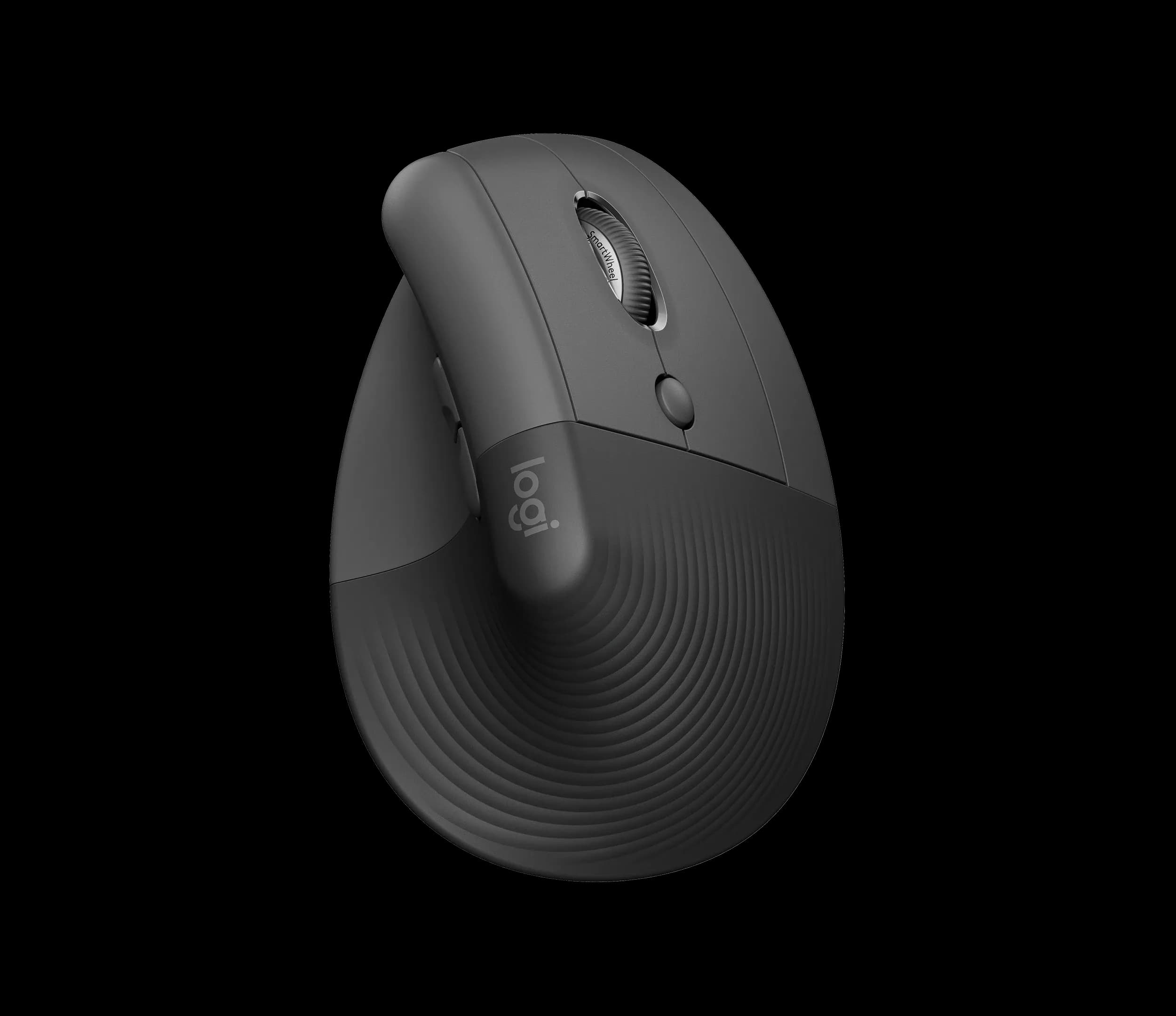
Best vertical mouse for small to medium hands
Logitech Lift Vertical Ergonomic Mouse, Graphite (910-006466)
For most people trying their first alternative to a flat mouse, the Logitech Lift is the one to get.
View at Amazon AUIt turns your hand on its side at 57 degrees, thumb on top, yet you move it around the desk just as you always have, so the switch is quick. Logitech designs it for small to medium hands, and a left-handed version is sold separately. One AA battery lasts up to 24 months, and it pairs with up to three devices. Skip it if your hands are large or you want the device to stay still. Amazon AU, Officeworks and JB Hi-Fi sell it; check the colour on each listing, as some show the Rose model rather than Graphite.
What we like
- 57-degree upright grip with no new pointing technique to learn
- Left-handed version available
- Up to 24 months per AA battery; quiet clicks
Watch out for
- Designed for small to medium hands
- No side-scroll wheel (a shortcut can be mapped in Logi Options+)
- Takes as much desk room as a regular mouse
- Best trackball for medium to large hands
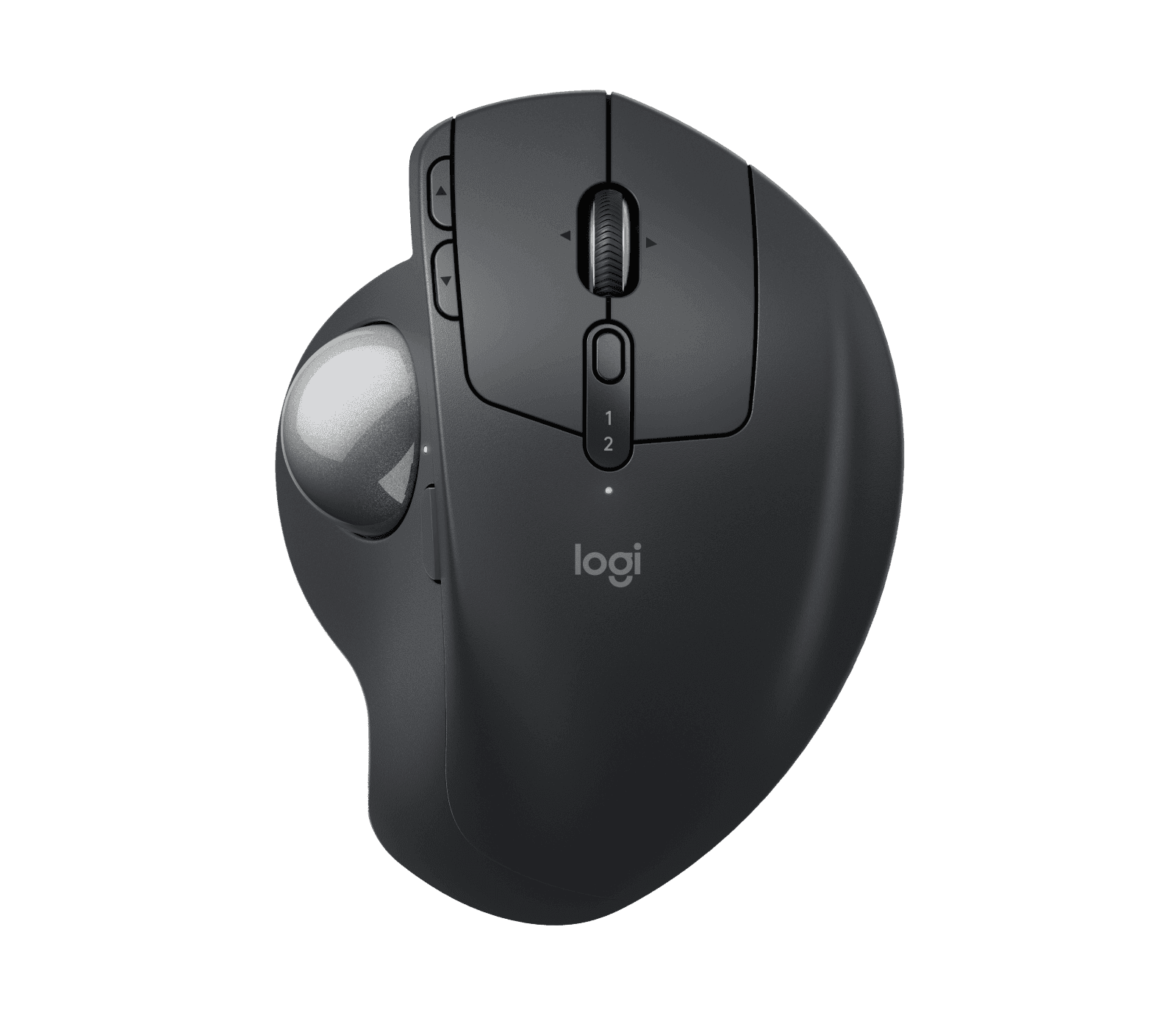
Logitech MX Ergo S Wireless Trackball Mouse, Graphite (910-007259)
The MX Ergo S is the pick for right-handers with medium to large hands who want a pointer that never travels.
View at Amazon AUThe body stays in one place while your thumb rolls the ball, and a hinge lets you set it flat or tilted up to 20 degrees. It adds a precision button for slow, fine cursor movement and charges over USB-C, with up to 120 days per charge. Get it for a crowded desk or if you would rather keep your arm still; skip it if you are left-handed, have small hands or want no learning period at all. JB Hi-Fi and Amazon AU sell it.
What we like
- Stays in one spot, so it fits a crowded desk
- 0 to 20-degree hinge and a precision-mode button
- Up to 120 days per USB-C charge; Logitech Flow across computers
Watch out for
- Right-handed only
- Designed for medium to large hands
- USB-C cable not supplied
- Thumb pointing needs practice, and the ball needs the odd clean
Quick answers
- Standard mouse: the familiar flat design. It has the widest range of sizes and many symmetrical shapes for either hand. If it already works for you, there is no reason to switch.
- Vertical mouse: the hand sits on its side, thumb up, and the mouse still moves across the desk. Pick the Lift for small to medium hands or if you are left-handed.
- Trackball: the device stays still while a ball under your thumb or fingers moves the cursor. Pick the MX Ergo S if you are right-handed with medium to large hands, or your desk has little spare room.
- Shop with returns in mind. Give any new pointing device a week or two before you decide.
How the three compare
| Standard mouse | Vertical mouse | Trackball |
|---|---|---|---|
What moves | The whole mouse | The whole mouse | Only the ball |
Hand position | Palm flat | Hand on its side, thumb on top | Hand rests on the body; on the MX Ergo S the thumb rolls the ball |
Space needed | Room to move | Room to move | Just its footprint |
Hands | Most sizes; many symmetrical | By model; Lift for small to medium hands, left-handed version available | By model; MX Ergo S for medium to large hands, right-handed only |
Settling in | Nothing to learn | Days: new grip only | Longer: a new way of pointing |
Our pick | None | Logitech Lift | Logitech MX Ergo S |
Why a standard mouse is still the baseline
The ordinary mouse is the one to measure the others against. You can find it in almost any size, often in a symmetrical shape, so it is the simplest type to fit to your hand. Set the pointer speed so a light touch moves the cursor, and use keyboard shortcuts for repetitive jobs, whichever mouse you own.
We have not picked one, as nearly any well-made mouse does the job. The decision here is whether to change your grip or your way of pointing.
A vertical mouse: same pointing, new grip
A vertical mouse only changes your hand’s angle. You still slide it and click with your fingers, so once the upright grip feels normal, nothing else is different.
Our pick is the Logitech Lift. It holds your hand at 57 degrees, with a textured grip and a thumb rest:
- Fit: Logitech designs it for small to medium hands. The left-handed Lift is a separate model; the one here (910-006466) is the right-handed Graphite version.
- Buttons and sensor: six buttons, customisable in Logi Options+, with quiet clicks and a 400 to 4000 DPI optical sensor. It weighs 125 g. It has no side-scroll wheel.
- Power and connection: one AA battery (in the box) runs it for up to 24 months. It connects by Bluetooth Low Energy or the included Logi Bolt receiver and switches between up to three devices.
Australian listings for the Lift vary by colour, and at the time of writing the JB Hi-Fi and Officeworks pages we link show the Rose model. The colour makes no difference to the specs, but check it if you want Graphite.
A trackball: new pointing, no travel
A trackball changes the way you point. Instead of moving the device, you roll a ball, with your thumb on the MX Ergo S or your fingers on centre-ball designs. Your arm stays where it is, and the trackball occupies only its own patch of desk.
Our pick is the Logitech MX Ergo S:
- Fit: a sculpted body with a soft rubber grip, designed by Logitech for medium to large hands. Right-handed only.
- Tilt: a hinge sets the angle anywhere from flat to 20 degrees.
- Buttons and speed: eight buttons in all, six customisable, with quiet clicks, a scroll wheel that tilts sideways and a precision-mode button that slows the cursor for detailed work. The sensor covers 512 to 2048 DPI, and Logitech Flow moves the cursor between computers.
- Weight: 164 g without the magnetic metal base plate, 259 g with it.
- Power and connection: rechargeable over USB-C, with up to 120 days per full charge and 24 hours of use from a one-minute charge. It connects by Bluetooth Low Energy or the Logi Bolt receiver. No cable comes in the box; any USB-C or USB-A to USB-C cable you own will work.
Buy it if you fit its hand size and want the cursor to move without your arm. Skip it if you are left-handed.
Vertical mouse vs trackball: the deciding factors
Pointing. A vertical mouse still moves with your arm; a trackball moves only under your thumb. This is the difference that decides it for most people. If thumb control sounds awkward, take the vertical mouse.
Desk room. A trackball stays in one spot, which suits a compact desk in a spare bedroom or a shared study nook. A vertical mouse needs the same travel room as any other. A keyboard without a number pad gives either one more space.
Hands. The Lift is for small to medium hands and comes in a left-handed version; the MX Ergo S is for medium to large hands and right-handed only. For a left-handed trackball, you would need a symmetrical, finger-operated model from another brand, which this guide doesn’t cover.
Power. The Lift runs up to two years on one AA battery. The MX Ergo S needs recharging every few months with a cable you provide.
Lift vs MX Ergo S: the specs
| Logitech Lift | Logitech MX Ergo S |
|---|---|---|
Type | Vertical mouse, 57 degrees | Thumb trackball, 0 to 20-degree hinge |
Hand size (Logitech) | Small to medium | Medium to large |
Handedness | Right-handed; left-handed version sold separately | Right-handed only |
Connection | Bluetooth Low Energy or Logi Bolt; up to 3 devices | Bluetooth Low Energy or Logi Bolt |
Power | 1 x AA, up to 24 months | USB-C rechargeable, up to 120 days per charge |
Buttons | 6, customisable | 8, of which 6 customisable, including precision mode |
Sensor range | 400 to 4000 DPI | 512 to 2048 DPI |
Weight | 125 g | 164 g without the base plate; 259 g with it |
Operating systems over Bluetooth | Windows 10 or 11, macOS 10.15 or later, iPadOS 14 or later, ChromeOS, Linux, Android 8 or later | Windows 10 or 11, macOS 12 or later, iPadOS 15 or later, ChromeOS, Linux, Android 12 or later |
USB-C cable | Not needed | Not supplied |
Before you buy: four practical checks
- Handedness. Only the Lift comes in a left-handed version, listed separately. Look for "Left" in the product name. The MX Ergo S is right-handed only.
- Hand size. Logitech states that the Lift is for small to medium hands and the MX Ergo S for medium to large hands. If you sit between the two, a shop with easy returns matters most.
- Learning time. The Lift takes days, because only the grip changes. The MX Ergo S takes longer, because thumb pointing is a new skill. Use its precision button for fine work early on, and allow at least a week.
- Keeping the ball clean. Trackballs gather dust and grime around the ball. On the MX Ergo S, lift off the magnetic metal base plate, push the ball out through the hole underneath, then wipe the ball and the small supports it rests on.
One more: Logi Options+, which customises the buttons, is available only for Windows and macOS. On ChromeOS and Linux both mice still work over Bluetooth with their basic functions.
The verdict
- Buy the Lift if your hands are small to medium, you are left-handed, or you want a new grip with no new pointing technique.
- Buy the MX Ergo S if you are right-handed with medium to large hands, short on desk room, or keen to keep your arm still.
- Buy neither if your current mouse suits you.
Changing your keyboard too? Do one at a time. Our best ergonomic keyboards guide covers models sold in Australia, and our MX Keys S vs MX Mechanical comparison compares two standard-layout keyboards.
Your consumer guarantees
Under the Australian Consumer Law, products must be of acceptable quality and match their description. If a mouse has a major fault, you can choose a refund or a replacement; for a minor fault, the retailer can choose to repair it instead. These guarantees apply on top of any warranty from Logitech or the shop. A change of mind is not covered, so check the store’s returns policy too.
How we chose
We have not tested these mice. We chose one vertical mouse and one thumb trackball from a maker that publishes clear specifications, including the hand size each is designed for, and that Australian retailers stock. Product details come from Logitech’s pages, listed under Sources. We don’t show or compare prices.
Related guides
- Ergonomic Keyboards and Mice: How to Choose: the complete guide to the desk, keyboard and mouse.
- Best Ergonomic Keyboards: keyboards sold in Australia.
- Logitech MX Keys S vs MX Mechanical: two Logitech keyboards compared.
Questions people ask
Which is quicker to get used to, a vertical mouse or a trackball?
A vertical mouse, because only your grip changes. A trackball asks you to point with your thumb, which usually takes a week or more to feel natural.
Is the Logitech Lift too small for big hands?
Logitech designs the Lift for small to medium hands. If yours are large, the MX Ergo S, designed for medium to large hands, is the better fit of our two picks.
Can left-handers use the MX Ergo S?
No. It is right-handed only. The Lift has a separate left-handed version, and a left-hander wanting a trackball needs a symmetrical, finger-operated model.
How do you clean the MX Ergo S trackball?
Take off the magnetic metal base plate, push the ball out through the hole underneath, and wipe the ball and the supports it sits on before putting it back.
What if my mouse is faulty?
The Australian Consumer Law guarantees apply. For a major fault you can choose a refund or a replacement; for a minor fault the retailer can repair it.