If you want to move away from a flat mouse, most people should start with the Logitech Lift. It is a vertical mouse, so your grip changes but the way you point does not, and that makes it the easier switch. Choose the Logitech MX Ergo S trackball instead if you are right-handed, your hands are medium to large, and you want something that sits still on the desk while your thumb does the work. For the wider picture, including keyboards, see our ergonomic keyboard and mouse guide.
Our picks at a glance
- View at Amazon UK
Best vertical mouse for small to medium hands
Logitech Lift Vertical Ergonomic Mouse, Graphite (910-006466)
- View at Logitech
Best trackball for medium to large hands
Logitech MX Ergo S Wireless Trackball Mouse, Graphite (910-007259)
The picks in detail
- Top pick
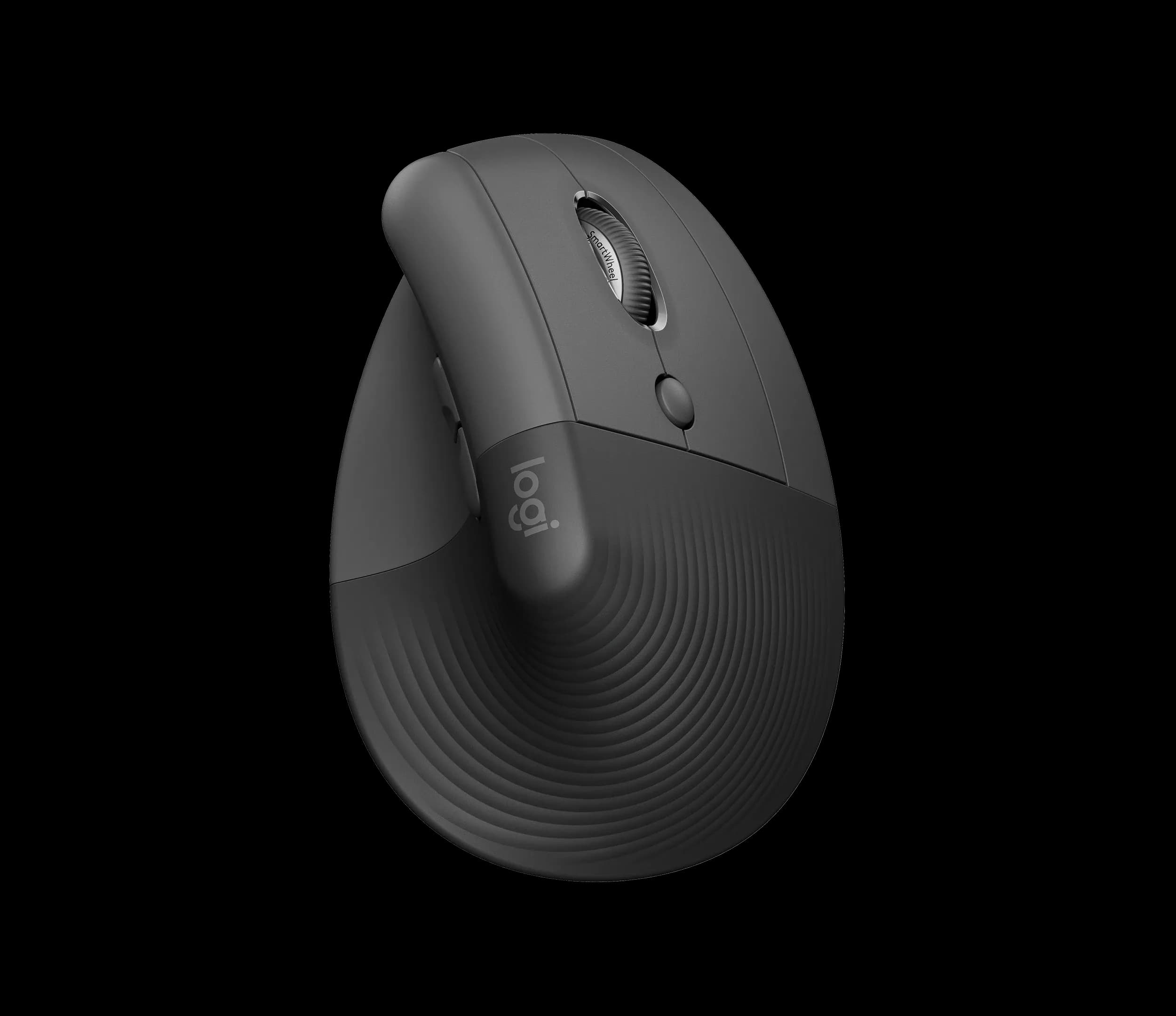
Best vertical mouse for small to medium hands
Logitech Lift Vertical Ergonomic Mouse, Graphite (910-006466)
The Logitech Lift is the safer first step away from a flat mouse.
View at Amazon UKIt holds your hand upright at 57 degrees with the thumb on top, but you still push it round the desk exactly as before, so there is little to relearn. Logitech designs it for small to medium hands, and it is the only one of our two picks with a left-handed version (sold as a separate model). It runs for up to 24 months on one AA battery and pairs with up to three devices. Buy it if your hands are small to medium or you are left-handed; skip it if you have large hands or want a mouse that stays still. You can buy it from Amazon UK.
What we like
- Upright 57-degree grip; pointing works as it always has
- Separate left-handed version available
- Up to 24 months on one AA battery, with quiet clicks
Watch out for
- Designed for small to medium hands
- No side-scroll wheel (a shortcut can be mapped in Logi Options+)
- Needs the same desk space as an ordinary mouse
- Best trackball for medium to large hands
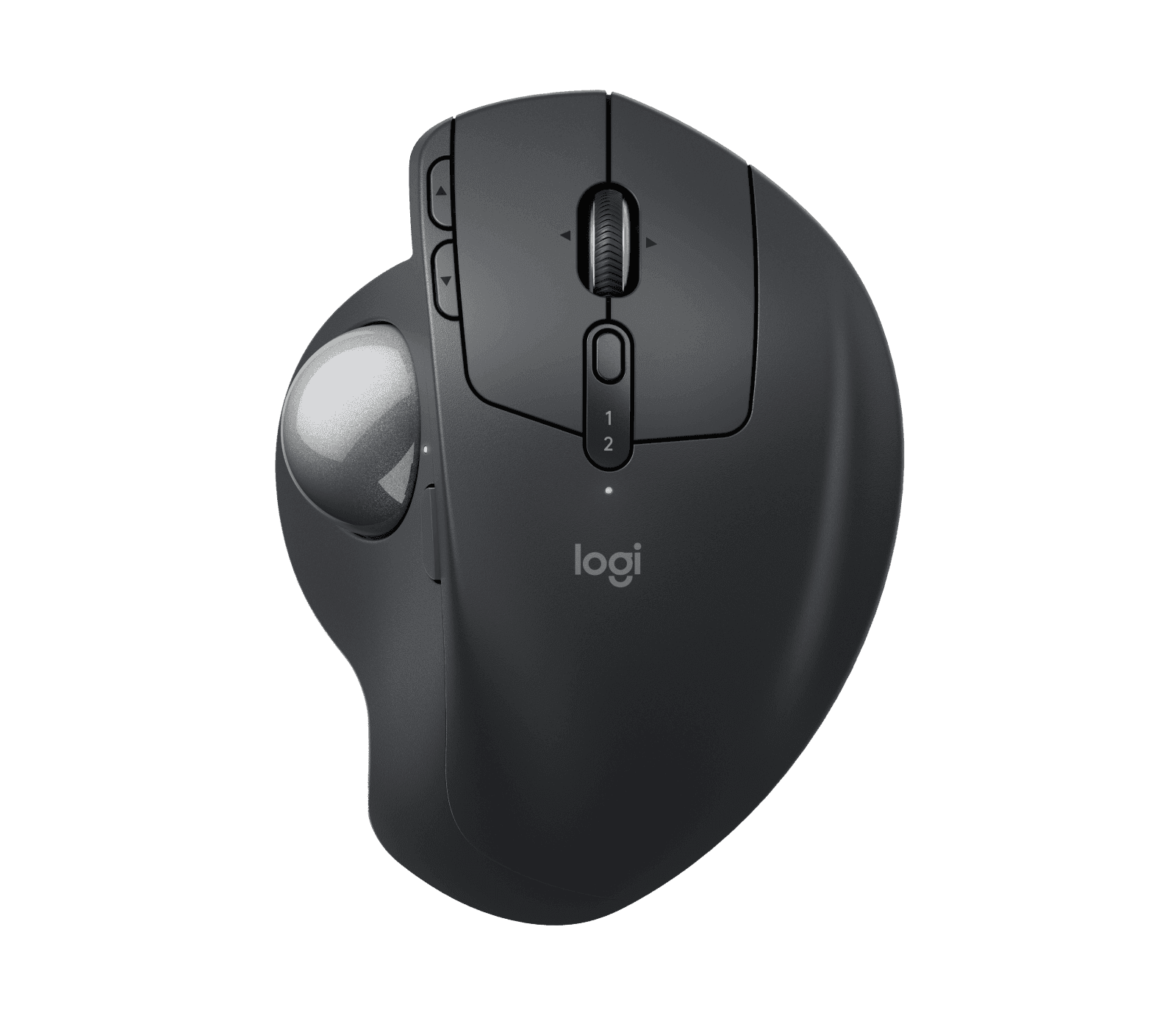
Logitech MX Ergo S Wireless Trackball Mouse, Graphite (910-007259)
The MX Ergo S suits right-handers with medium to large hands who want the cursor to move while the device stays put.
View at LogitechYour thumb rolls the ball, and a hinge sets the body anywhere from flat to a 20-degree tilt. A precision button slows the cursor for fine work, and a USB-C charge lasts up to 120 days. Buy it for a cramped desk or if you would rather not slide anything; skip it if you are left-handed, have small hands or do not want a week of getting used to thumb pointing. Logitech UK sells it as part number 910-007260, and Amazon UK stocks it too.
What we like
- Needs no room to move, just its own footprint
- Adjustable 0 to 20-degree hinge and a precision-mode button
- Up to 120 days per USB-C charge; Logitech Flow between computers
Watch out for
- Right-handed only
- Designed for medium to large hands
- No USB-C cable in the box
- Thumb pointing takes time to learn, and the ball needs cleaning now and then
In brief
- Standard mouse: the flat shape on most desks, sold in more sizes than either alternative, and often symmetrical, so it works in either hand. If yours suits you, keep it.
- Vertical mouse: your hand stands on its side, thumb uppermost, and you still move the mouse to move the cursor. The Lift is our pick for small to medium hands and for left-handers.
- Trackball: the device stays where it is and you roll a ball with your thumb or fingers. The MX Ergo S is our pick for right-handers with medium to large hands, especially on a narrow desk.
- Buy somewhere with easy returns. A new pointing device needs a week or two of daily use before you can judge it.
The three types side by side
| Standard mouse | Vertical mouse | Trackball |
|---|---|---|---|
What moves | The whole mouse | The whole mouse | Only the ball |
How you hold it | Palm flat on top | Hand upright, thumb on top | Hand rests on the body; on the MX Ergo S your thumb works the ball |
Desk space | Room to travel | Room to travel | Its own footprint only |
Hands | Widest choice of sizes, many symmetrical | By model; Lift for small to medium hands, left-handed version available | By model; MX Ergo S for medium to large hands, right-handed only |
Getting used to it | Nothing new | A few days: new grip, same pointing | Longer: a new way to point |
Our pick | None | Logitech Lift | Logitech MX Ergo S |
Where a standard mouse still wins
A standard mouse is the yardstick. It comes in the widest spread of sizes, and many are symmetrical, so finding one that fits your hand, left or right, is easiest with this type. Whatever you use, set the pointer speed so a light touch moves the cursor, and learn the keyboard shortcuts for things you do all day.
We have not picked one because almost any decent mouse will do. The choice that matters is whether you want to change the shape you hold or the way you point.
What changes with a vertical mouse
A vertical mouse changes the angle of your hand and nothing else. You still glide it over the desk and click with your fingers, so after a few days with the new grip, everything works as it did.
Our pick is the Logitech Lift. It sets your hand at 57 degrees, with a soft textured grip and a thumb rest:
- Fit: Logitech designs the Lift for small to medium hands. A left-handed version is sold as a separate model; the one described here (910-006466) is the right-handed Graphite version.
- Buttons and sensor: six buttons you can customise in Logi Options+, quiet clicks, and an optical sensor from 400 to 4000 DPI. It weighs 125 g. There is no side-scroll wheel.
- Power and connection: one AA battery (included) lasts up to 24 months. It connects by Bluetooth Low Energy or the Logi Bolt USB receiver in the box, and switches between up to three devices.
If your hands are on the large side, look at the MX Ergo S instead. The Lift’s problem for you would be size, not design.
What changes with a trackball
A trackball changes the way you point. The device stays put and you roll a ball, with your thumb on the MX Ergo S or with your fingers on centre-ball designs. Your arm does not move, and the trackball takes up no more room than its own base.
Our pick is the Logitech MX Ergo S:
- Fit: a sculpted shape with a soft rubber grip, designed by Logitech for medium to large hands. Right-handed only.
- Tilt: a hinge sets the body anywhere between flat and 20 degrees.
- Buttons and speed: eight buttons, six of them customisable, with quiet clicks, a scroll wheel that tilts left and right, and a precision-mode button that drops the cursor speed when you need accuracy. The sensor runs from 512 to 2048 DPI, and Logitech Flow lets the cursor move between computers.
- Weight: 164 g without the magnetic metal base plate, 259 g with it.
- Power and connection: USB-C rechargeable, up to 120 days per full charge, and a one-minute charge gives a day’s use. It connects by Bluetooth Low Energy or the Logi Bolt receiver. The cable is not included, but any USB-C or USB-A to USB-C cable will charge it.
Choose it if you want to stop pushing a mouse about and your hand fits it. Skip it if you are left-handed.
Vertical mouse vs trackball: what actually differs
How you point. With a vertical mouse your arm still moves the cursor. With a trackball only your thumb does. For most buyers, that one difference settles it: if thumb pointing sounds fiddly, get the vertical mouse.
Space. A trackball sits in one spot, which helps on a small desk in a box room or a laptop on the kitchen table. A vertical mouse needs as much travel room as any mouse. A compact keyboard without a number pad frees up space for either.
Hands. The Lift covers small to medium hands and has a left-handed version; the MX Ergo S covers medium to large hands and is right-handed only. Left-handers who want a trackball need a symmetrical, finger-operated model from another brand, which we don’t cover here.
Power. One AA battery runs the Lift for up to two years. The MX Ergo S needs a top-up every few months from a cable you supply yourself.
Our two picks compared
| Logitech Lift | Logitech MX Ergo S |
|---|---|---|
Type | Vertical mouse, 57 degrees | Thumb trackball, 0 to 20-degree hinge |
Hand size (Logitech) | Small to medium | Medium to large |
Handedness | Right-handed; left-handed version sold separately | Right-handed only |
Connection | Bluetooth Low Energy or Logi Bolt; up to 3 devices | Bluetooth Low Energy or Logi Bolt |
Power | 1 x AA, up to 24 months | USB-C rechargeable, up to 120 days per charge |
Buttons | 6, customisable | 8, of which 6 customisable, including precision mode |
Sensor range | 400 to 4000 DPI | 512 to 2048 DPI |
Weight | 125 g | 164 g without the base plate; 259 g with it |
Operating systems over Bluetooth | Windows 10 or 11, macOS 10.15 or later, iPadOS 14 or later, ChromeOS, Linux, Android 8 or later | Windows 10 or 11, macOS 12 or later, iPadOS 15 or later, ChromeOS, Linux, Android 12 or later |
USB-C cable | Not needed | Not in the box |
Four things to check before you order
- Left or right hand. Only the Lift has a left-handed version, and it is a different listing. Make sure the page says "Left" before you buy. There is no left-handed MX Ergo S.
- Hand size. Logitech states that the Lift is for small to medium hands and the MX Ergo S for medium to large hands. If you are in between, buy where returns are easy.
- The learning curve. The Lift takes a few days, because only your grip changes. The MX Ergo S takes longer, since you are learning to point with your thumb; use the precision button for fine work while you adjust, and give it at least a week.
- Cleaning the ball. Every trackball gathers dust and grime around the ball. On the MX Ergo S, take off the magnetic metal base plate, push the ball out through the hole underneath, and wipe the ball and the small supports it sits on.
Also worth knowing: Logi Options+, the app that customises the buttons, runs only on Windows and macOS. Both mice still work on ChromeOS and Linux over Bluetooth, with basic functions.
Which should you buy?
- The Lift if your hands are small to medium, you are left-handed, or you want a new grip without learning a new way to point.
- The MX Ergo S if you are right-handed with medium to large hands, your desk is tight, or you would rather your arm stayed still.
- Neither if your current mouse already suits you.
If you are also replacing your keyboard, change one thing at a time. Our best ergonomic keyboards guide covers the options sold in the UK, and our MX Keys S vs MX Mechanical comparison looks at two standard-layout boards.
Your rights if it is faulty
Under the Consumer Rights Act 2015, goods must be of satisfactory quality and as described. If a mouse turns out to be faulty, you can reject it for a refund within 30 days of delivery, and after that the retailer must repair or replace it. That is separate from a shop’s own returns policy for items you simply don’t get on with.
How we chose
We have not tested these mice. We chose one vertical mouse and one thumb trackball from a maker that publishes clear specifications, including the hand size each one is designed for, and that UK retailers sell. Product details come from Logitech’s pages, linked below. We don’t show or compare prices.
Related guides
- Ergonomic Keyboards and Mice: How to Choose: the complete guide to the desk, keyboard and mouse.
- Best Ergonomic Keyboards: keyboards sold in the UK.
- Logitech MX Keys S vs MX Mechanical: which of two Logitech keyboards to buy.
Questions people ask
Is a vertical mouse or a trackball easier to get used to?
A vertical mouse. Only your grip changes, so most people settle in within days. A trackball means learning to point with your thumb, which takes longer.
Does the Logitech Lift suit large hands?
Logitech designs the Lift for small to medium hands. With large hands, the MX Ergo S, designed for medium to large hands, is the better fit of our two picks.
Is there a left-handed MX Ergo S?
No, it is right-handed only. The Lift comes in a separate left-handed version, and left-handers who want a trackball need a symmetrical, finger-operated model.
How do I clean the MX Ergo S?
Remove the magnetic metal base plate, push the ball out through the hole underneath, and wipe the ball and the supports it rests on before refitting it.
Can I return a mouse I don’t get on with?
That depends on the shop’s returns policy, so check it before you buy. The Consumer Rights Act 2015 covers faulty goods: you can reject a faulty item for a refund within 30 days.