For most people in the UK, the best first ergonomic keyboard and mouse is the Logitech Wave Keys and Lift Combo: a compact wave keyboard that keeps its number pad, plus a vertical mouse, on one receiver. Buy the English UK version, 920-013634. If you want a clearer split, the Logitech ERGO K860 (UK model 920-010107) works with any mouse.
Our picks at a glance
- View at Logitech
Best starter combo
- View at Logitech
Best full-size curved keyboard
- View at Amazon UK
Best vertical mouse for small to medium hands
Logitech Lift Vertical Ergonomic Mouse, Graphite (910-006466)
- View at Logitech
Best thumb trackball for medium to large hands
Logitech MX Ergo S Wireless Trackball Mouse, Graphite (910-007259)
The picks in detail
- Top pick
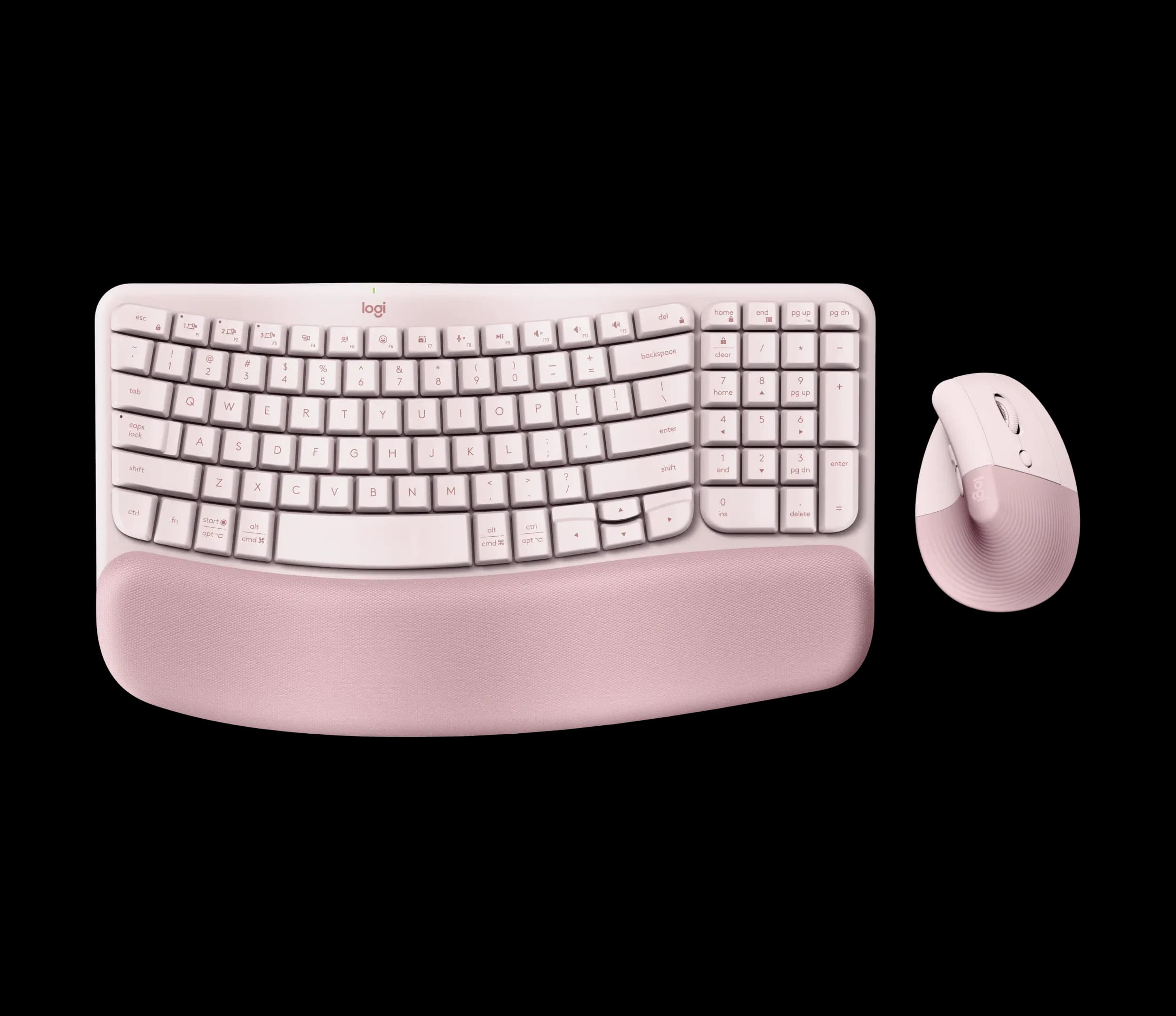
Best starter combo
Logitech Wave Keys and Lift Combo, Rose (920-013612)
For a first go at ergonomic gear, most people in the UK should buy the Wave Keys and Lift Combo.
View at LogitechIt pairs the Wave Keys, a compact wave-shaped keyboard with a number pad and a fixed three-layer cushioned palm rest, with the Lift, a vertical mouse angled at 57°. One Logi Bolt receiver runs both, or you can use Bluetooth, and each switches between three devices. The keyboard runs for up to 36 months on two AAA batteries, the mouse for up to 24 months on one AA. The English UK version is 920-013634 (Graphite); Logitech also sells Swiss and English International versions that look almost the same. Skip it if your hands are large, as the Lift is made for small to medium hands.
What we like
- A keyboard and a vertical mouse in one box, on one receiver
- Compact keyboard that still has a number pad
- Sold in English UK layout (920-013634)
Watch out for
- The palm rest is permanently attached
- Neither device is backlit
- The mouse is sized for small to medium hands
- Best full-size curved keyboard
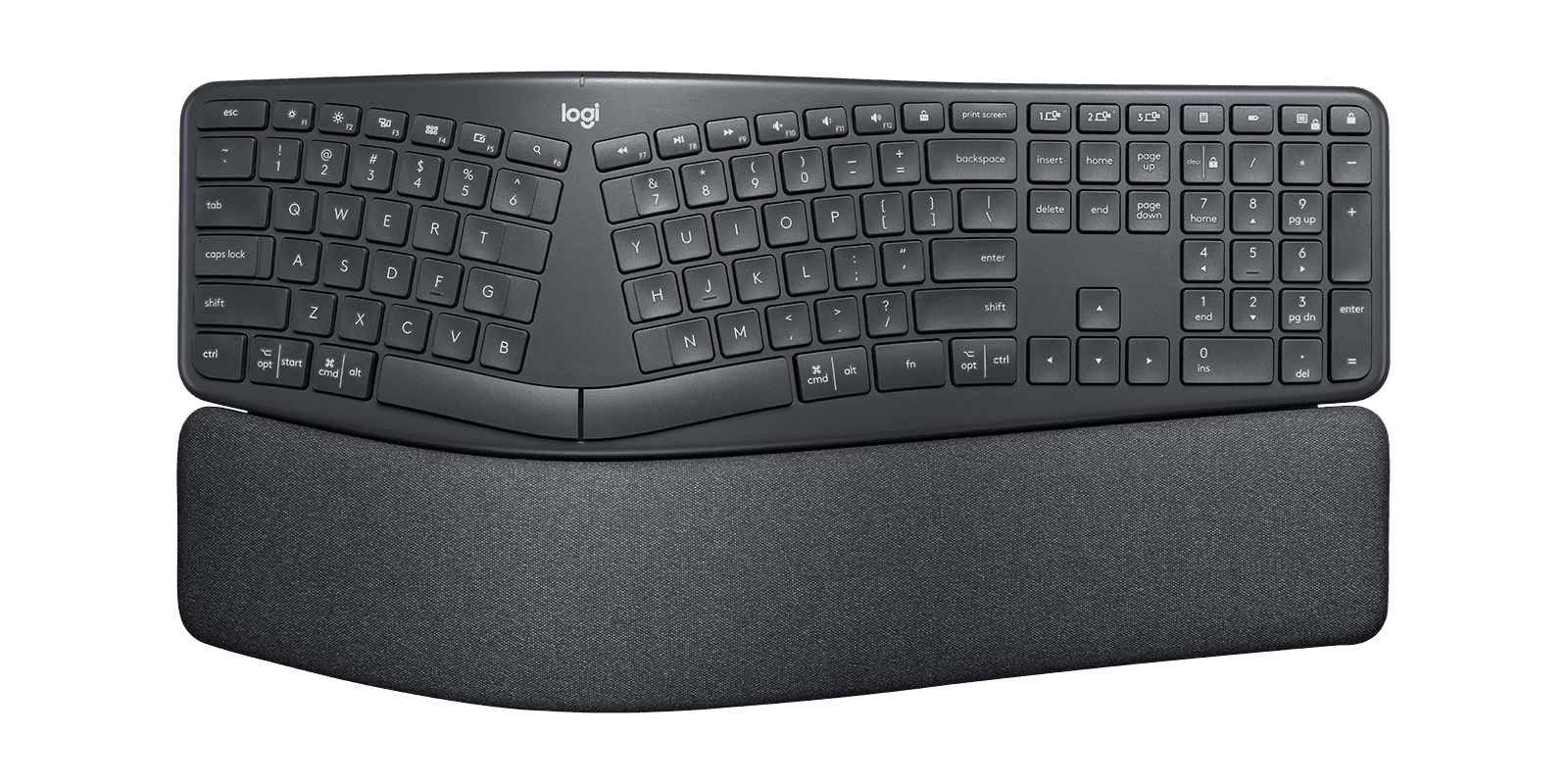
Logitech ERGO K860 Split Ergonomic Keyboard (920-009166)
The Logitech ERGO K860 is the one to buy if you want the keys clearly split but still in one piece.
View at LogitechIt is full size with a number pad, the frame curves upwards and a pillowed wrist rest is built in. Legs under the front edge set it at 0°, -4° or -7°. It connects by Bluetooth Low Energy or Logitech’s Unifying receiver, pairs with three devices and runs for up to 24 months on two AAA batteries. The UK model is 920-010107, English UK QWERTY. Choose it and add the mouse you prefer. Skip it on a narrow desk: at 456 mm wide it takes far more room than a standard keyboard.
What we like
- Curved split layout with a full number pad
- Three tilt settings: 0°, -4° and -7°
- Up to 24 months on 2 x AAA; pairs with 3 devices
Watch out for
- Wrist rest is fixed and can’t be removed
- Unifying receiver, so it can’t share a receiver with a Logi Bolt mouse (Bluetooth works for both)
- No backlighting
- Best vertical mouse for small to medium hands
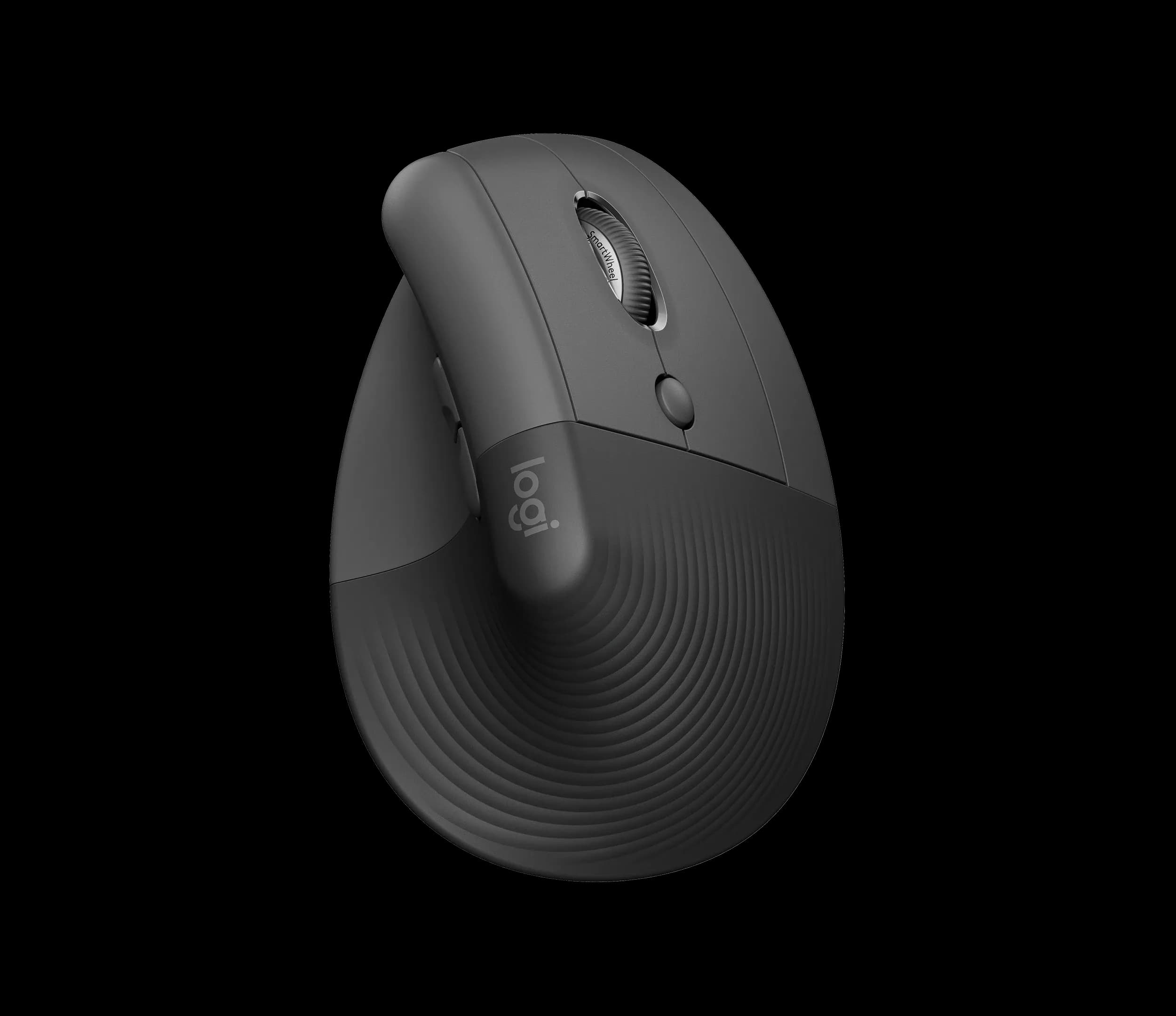
Logitech Lift Vertical Ergonomic Mouse, Graphite (910-006466)
The Logitech Lift turns the mouse on its side at 57°, so you hold it like a handshake, with a textured grip and a thumb rest.
View at Amazon UKLogitech makes it for small to medium hands and sells a left-handed model separately. One AA battery (included) lasts up to 24 months, it connects by Bluetooth Low Energy or the included Logi Bolt receiver, switches between three devices and has six programmable buttons. Buy it if you want a vertical mouse and your hands aren’t large. Skip it if they are, and check the listing is the right-handed model before you order.
What we like
- Vertical 57° angle with a thumb rest
- Left-handed model available
- Up to 24 months on one AA battery; 3 devices
Watch out for
- Sized for small to medium hands
- No side-scroll wheel (shortcuts can be mapped in Logi Options+)
- Best thumb trackball for medium to large hands
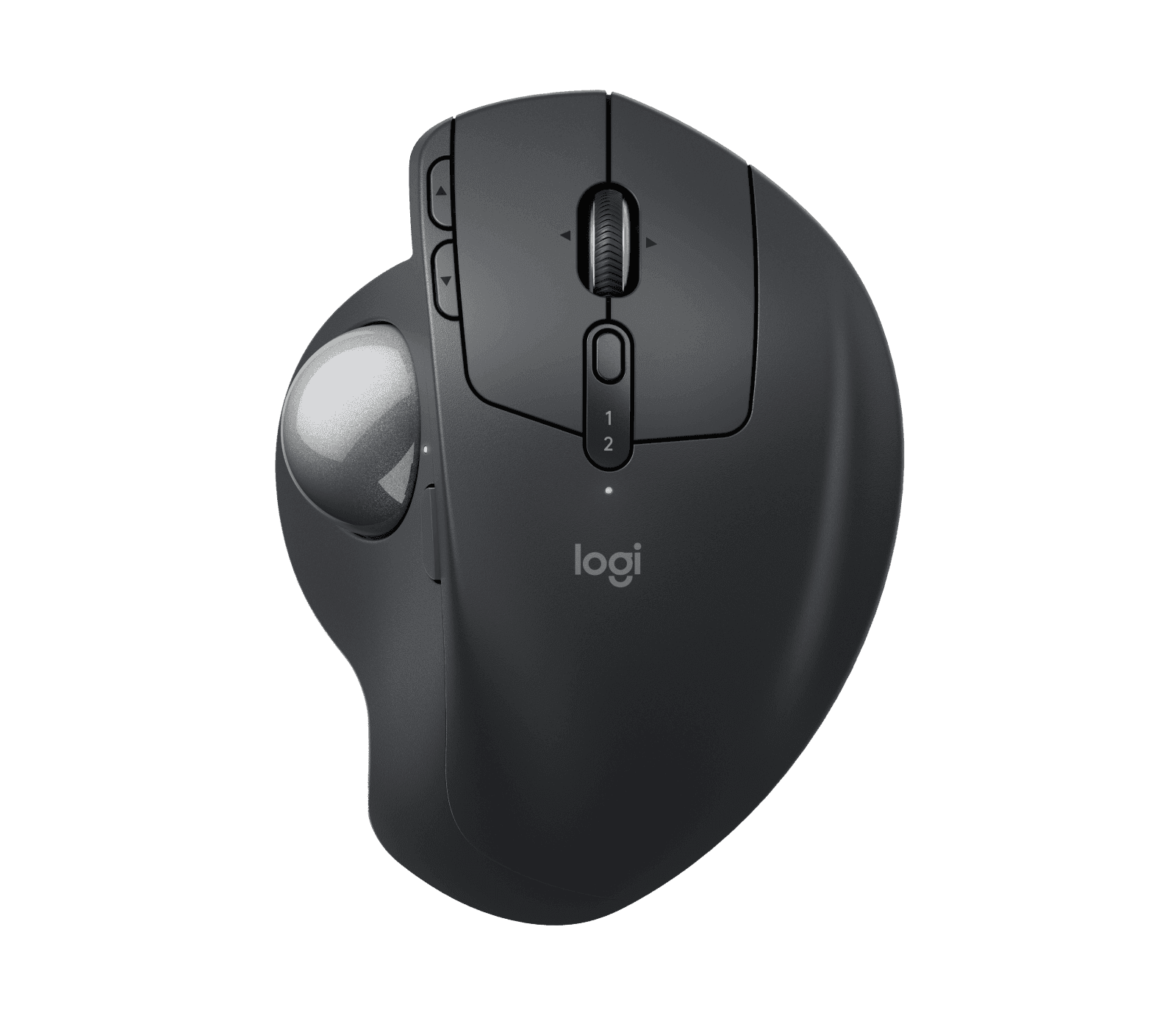
Logitech MX Ergo S Wireless Trackball Mouse, Graphite (910-007259)
The MX Ergo S is a trackball: the body stays still and your thumb moves the ball, so it works in a gap no wider than the mouse itself.
View at LogitechA hinge tilts it anywhere from 0° to 20°. It suits medium to large hands, charges over USB-C (up to 120 days per charge, and a one-minute charge gives 24 hours), connects by Bluetooth or Logi Bolt, and has a precision button that slows the cursor while you hold it. The UK model is 910-007260 (Graphite). Buy it if you are right-handed and short of desk space. Skip it if you are left-handed: there is no left-handed version.
What we like
- Hinge tilts the trackball from 0° to 20°
- Rechargeable over USB-C; up to 120 days per charge
- Precision button and Logitech Flow across computers
Watch out for
- Right-handed only
- No USB-C cable in the box
- Some shops also list an MX Ergo S Plus with an extra wedge, so check the model
We have not tested these products; the figures come from Logitech's UK product pages, linked under Sources. If you are mainly after a keyboard, our best ergonomic keyboards guide compares the K860 and the Wave Keys in more depth, with the full UK layout checklist.
The short version
- Start with the layout. Every keyboard here is sold in several layouts, sometimes on one product page. Look for "English UK (QWERTY)" and the UK part number.
- Keyboard: choose how different from a normal keyboard you want it: a gentle wave, a curved split in one piece, or two separate halves.
- Mouse: choose standard, vertical or trackball, then match the hand size Logitech gives and your handedness.
- Measure the desk: the K860 alone is 456 mm wide, before you add a mouse.
- Buy where returns are easy: no single design suits everyone.
What "ergonomic" means here
"Ergonomic" is a description of shape, not a standard. A keyboard sold as ergonomic angles, curves or splits the keys, and usually adds a padded rest and adjustable legs. An ergonomic mouse stands on its side or swaps the moving mouse for a trackball. This guide sticks to those physical differences: shape, size, tilt and fit.
Check the UK layout first
A shape you like is no use if the keys are in the wrong places. UK keyboards use the ISO shape: a tall Enter key spanning two rows, a £ sign on Shift+3, @ on Shift+' and an extra key beside the left Shift. US and English International layouts differ.
Logitech sells each keyboard here in many layouts, and the variants can share one page:
- Wave Keys and Lift Combo: English UK is 920-013634. The Swiss (QWERTZ) and English International versions are 920-013885 and 920-013635.
- ERGO K860: English UK is 920-010107.
- Wave Keys on its own: English UK is 920-012301 in Graphite.
Mice have no layout, but the Lift comes in right- and left-handed versions under similar names, so check that too.
Plan the desk
Measure before you buy. The K860 is 456 mm wide and 233 mm deep, with its rest built in; the Wave Keys is 376 mm by 219 mm. Add room for the mouse beside it. A trackball like the MX Ergo S stays in one place, which helps on a small desk. If you work on a laptop, a separate keyboard and mouse also let you raise the laptop on a stand or connect a monitor.
How to choose an ergonomic keyboard
Size and the number pad
Keep the number pad if you work with figures all day. The Wave Keys is the compromise: 376 mm long, 80 mm shorter than the K860, and it still has a number pad. If you never use one, a tenkeyless keyboard lets the mouse come closer.
Wave, curved split or fully split
- Wave, one piece. The rows rise and fall in a gentle curve. The Wave Keys types much like a normal keyboard.
- Curved split, one piece. The keys split down the middle and the frame arches upwards, as on the K860. Nothing to set up.
- Fully split. Two halves you place yourself. The most adjustable, with the most fiddling. We don't currently link to a UK shop for one in a UK layout.
Allow a few days of typos with any new layout.
Tilt and wrist rests
Most keyboards are raised at the back. Negative tilt raises the front instead; the K860's legs give 0°, -4° or -7°. The Wave Keys only tilts the usual way, +4°.
Both Logitech keyboards have the rest permanently attached. That means nothing to line up, but you can't remove it to clean it or swap in your own. Logitech suggests wiping the Wave Keys rest with a slightly damp, lint-free cloth.
Receivers and batteries
The Wave Keys, Lift and MX Ergo S use Logi Bolt receivers; the K860 uses the older Unifying receiver, and the two types don't mix. If you pair a K860 with a Lift, use Bluetooth or two receivers. The K860, Wave Keys and Lift run on ordinary AAA or AA batteries for up to two or three years; the MX Ergo S recharges over USB-C, but Logitech doesn't include the cable.
How to choose an ergonomic mouse
Standard, vertical or trackball
- Standard. The familiar shape, in many sizes.
- Vertical. Stands on its side, held like a handshake. You still move the whole mouse. The Lift is angled at 57°.
- Trackball. The body doesn't move; your thumb or fingers move a ball. The MX Ergo S is a thumb trackball.
Our vertical mouse vs trackball comparison goes through the difference in detail.
Hand size and handedness
Logitech makes the Lift for small to medium hands and the MX Ergo S for medium to large ones. The Lift has a left-handed model; the MX Ergo S is right-handed only, so left-handers should look at the Lift.
Buttons and pointer speed
Both mice have six programmable buttons in Logitech's free Logi Options+ app. The MX Ergo S adds a precision button that slows the cursor for fine work, and the Lift's sensor goes up to 4000 DPI.
Combo or separate?
The combo gives you one box and one receiver. The catch is that the mouse is fixed: if your hands are large, the Lift won't fit, and you are better off buying the Wave Keys (920-012301) and an MX Ergo S separately. The K860 also works with any mouse.
Our four picks compared
Pick | Type | Best for | Connection | Power |
|---|---|---|---|---|
Logitech Wave Keys and Lift Combo (920-013634) | Wave keyboard with number pad plus vertical mouse | A first try with one purchase | Bluetooth LE or Logi Bolt; 3 devices each | Keyboard 2 x AAA (up to 36 months); mouse 1 x AA (up to 24 months) |
Logitech ERGO K860 (920-010107) | Curved split, full size | A clear split and a number pad | Bluetooth LE or Unifying; 3 devices | 2 x AAA, up to 24 months |
Logitech Lift | Vertical mouse, 57° | Small to medium hands; left-handed model exists | Bluetooth LE or Logi Bolt; 3 devices | 1 x AA, up to 24 months |
Logitech MX Ergo S (910-007260) | Thumb trackball, 0° to 20° hinge | Medium to large hands, right-handed | Bluetooth or Logi Bolt | USB-C rechargeable, up to 120 days |
All four are Logitech: these are the models we could match to a UK shop with the right layout and part number. Compare other brands too.
Which setup is right for you
- One easy first step: the Wave Keys and Lift Combo.
- A clear split and a number pad: the K860, with the mouse of your choice.
- A vertical mouse: the Lift, for small to medium hands, left or right.
- Little desk space, or large hands: the MX Ergo S, if you are right-handed.
- Not sure yet: change the keyboard first and keep your mouse, or the other way round, so you can tell which change you like.
Buying in the UK
Under the Consumer Rights Act 2015, goods must be of satisfactory quality, fit for purpose and as described, and you can reject a faulty item for a refund within 30 days. That is separate from Logitech's own warranty. For a keyboard, also check the layout and part number on the listing before you pay; a keyboard in the wrong layout isn't faulty, so a return then depends on the shop's own policy.
How we chose
We have not tested these products. We picked one example of each main design, a combo, a curved split keyboard, a vertical mouse and a trackball, and kept only models we could link to a UK shop. We then checked the UK part numbers on Logitech's UK site and took the specifications from its UK product pages.
Related guides
- Best Ergonomic Keyboards in the UK: the K860 and Wave Keys compared, with the UK layout checklist.
- Vertical Mouse vs Trackball
- Logitech MX Keys S vs MX Mechanical: two flat keyboards sold in UK layout.
Questions people ask
Is there one best ergonomic keyboard and mouse?
No. Hand size, desk space and taste differ, so the right choice differs too. Try designs where you can, and buy from a shop with an easy returns policy.
How do I make sure I get a UK layout?
Look for "English UK (QWERTY)" and the UK part number: 920-013634 for the Wave Keys and Lift Combo, 920-010107 for the ERGO K860 and 920-012301 for the Wave Keys on its own. English International and Swiss versions look similar but are different layouts.
What is the difference between a vertical mouse and a trackball?
A vertical mouse stands on its side so you hold it like a handshake, and you still move the whole mouse. A trackball stays in place and you move a ball with your thumb or fingers.
Is there an ergonomic mouse for left-handed people?
Yes. Logitech sells a left-handed version of the Lift. The MX Ergo S trackball is right-handed only.
Can I buy an ergonomic keyboard and mouse as a combo?
Yes. The Logitech Wave Keys and Lift Combo is sold as a pair, and both devices run from one Logi Bolt receiver or Bluetooth. In the UK, choose the English UK version, 920-013634.
Sources we used
- Logitech Wave Keys and Lift Combo: product page, specifications and layout variants (UK)
- Logitech ERGO K860, English UK (920-010107): product page and specifications (UK)
- Logitech Wave Keys, English UK (920-012301): product page and specifications (UK)
- Logitech Lift Vertical Ergonomic Mouse: product page and specifications (UK)
- Logitech MX Ergo S (910-007260): product page and specifications (UK)
- Consumer Rights Act 2015 (legislation.gov.uk)